
You do not need a laptop to start creating many digital products. You need a real problem, a useful solution, the right mobile tools and a product format that is practical to create, test, deliver and improve from a smartphone.
A phone can now handle research, writing, simple design, PDF export, spreadsheet editing, short-form video, screen recording, cloud storage and AI-assisted workflows. That makes phone-first creation genuinely possible for many beginner products. But “possible” is not the same as “comfortable,” and a smartphone is still a poor fit for some advanced products.
You can create checklists, worksheets, short PDF guides, mini ebooks, planners, trackers, Canva templates, social-media template packs, swipe files, prompt workflows, resource lists, workbooks, simple spreadsheets, recorded tutorials, short video lessons, audio resources and small digital toolkits using only a phone.
Advanced spreadsheets, large courses, complex websites, software, apps, advanced automation, large databases and heavy video production are usually easier on a computer.
IDEA → VALIDATE → CREATE → DESIGN → TEST → EXPORT → PUBLISH → MARKET → IMPROVE
ONE PHONE + ONE AUDIENCE + ONE PROBLEM + ONE USEFUL PRODUCT
If you have not decided what product format fits your problem, choose that first. The previous VEZILL guide on beginner digital-product formats should be used as the decision step once its published URL is live; do not invent a link before publication.
Phone-first does not mean compromise-first. The product still needs to be accurate, useful, readable, tested and easy for a customer to use.
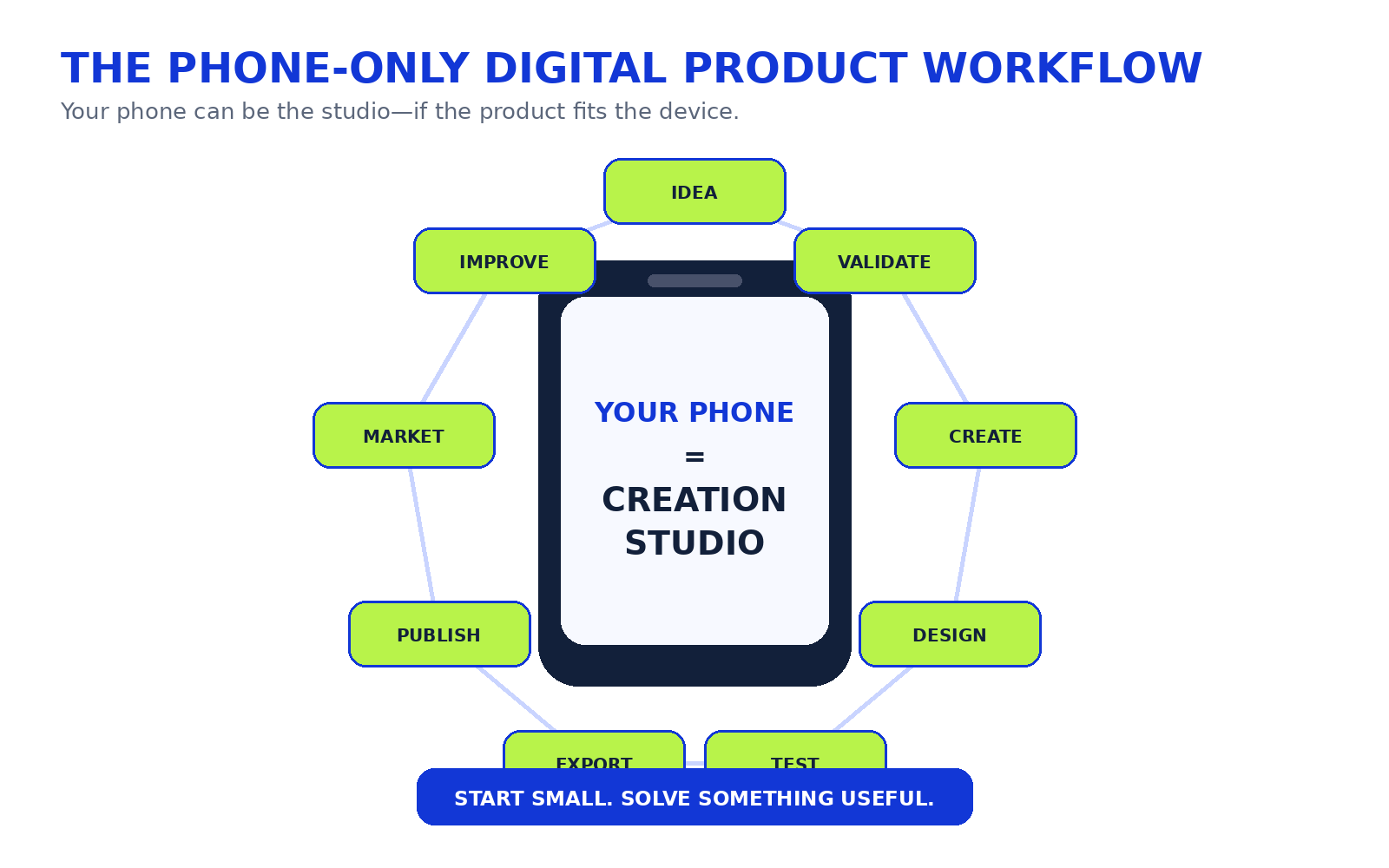 Your phone can be a creation studio when the format fits the device and the problem is validated first.
Yes—for many product types. Current mobile tools can create and edit documents and spreadsheets, work offline in some cases, export files, record screens and edit short videos. The practical question is not whether a phone can technically perform a task; it is whether you can complete the entire product workflow comfortably and reliably.
| Task | Phone Suitability | Notes |
|---|---|---|
| Research | Excellent | Browser, AI and communities work well on mobile. |
| Writing | Good | Strong for shorter products; long manuscripts become tiring. |
| Basic design | Excellent | Mobile design apps are capable, but small screens reward simple layouts. |
| PDF creation | Excellent | Practical for guides, worksheets and planners. |
| Simple spreadsheets | Good | Useful for trackers and basic formulas. |
| Templates | Excellent | Especially visual or document-based templates. |
| Short video | Excellent | Phone cameras, screen recording and mobile editors are strong. |
| Audio | Excellent | Recording and light editing are practical. |
| Large course | Possible but inconvenient | Storage, file management and editing become cumbersome. |
| Coding | Limited–Moderate | Depends on the platform and project. |
| Software development | Poor for most beginners | A computer is usually more practical. |
| Advanced spreadsheet | Limited | Complex formulas, dashboards and large datasets are harder. |
| Large file management | Limited | Storage, backups and transfer speed matter. |
Before choosing a product, test the whole lifecycle—not only the creation step.
Can I create it comfortably?The small screen should not make basic production painful. Can I test it?You need to open, use and troubleshoot the finished product. Can I export it correctly?The customer-ready format must preserve layout, links and quality. Can customers open it easily?Do not assume they use the same phone or app. Can I update it?You should be able to fix errors or issue a new version. Can I store and back it up?One accidental deletion should not destroy your product. Can I support customers?Instructions and common fixes should be manageable from mobile.THE PHONE-FIRST TEST: CREATE → TEST → EXPORT → DELIVER → UPDATE
If one stage becomes unnecessarily difficult, reconsider the format or plan to use a computer later.
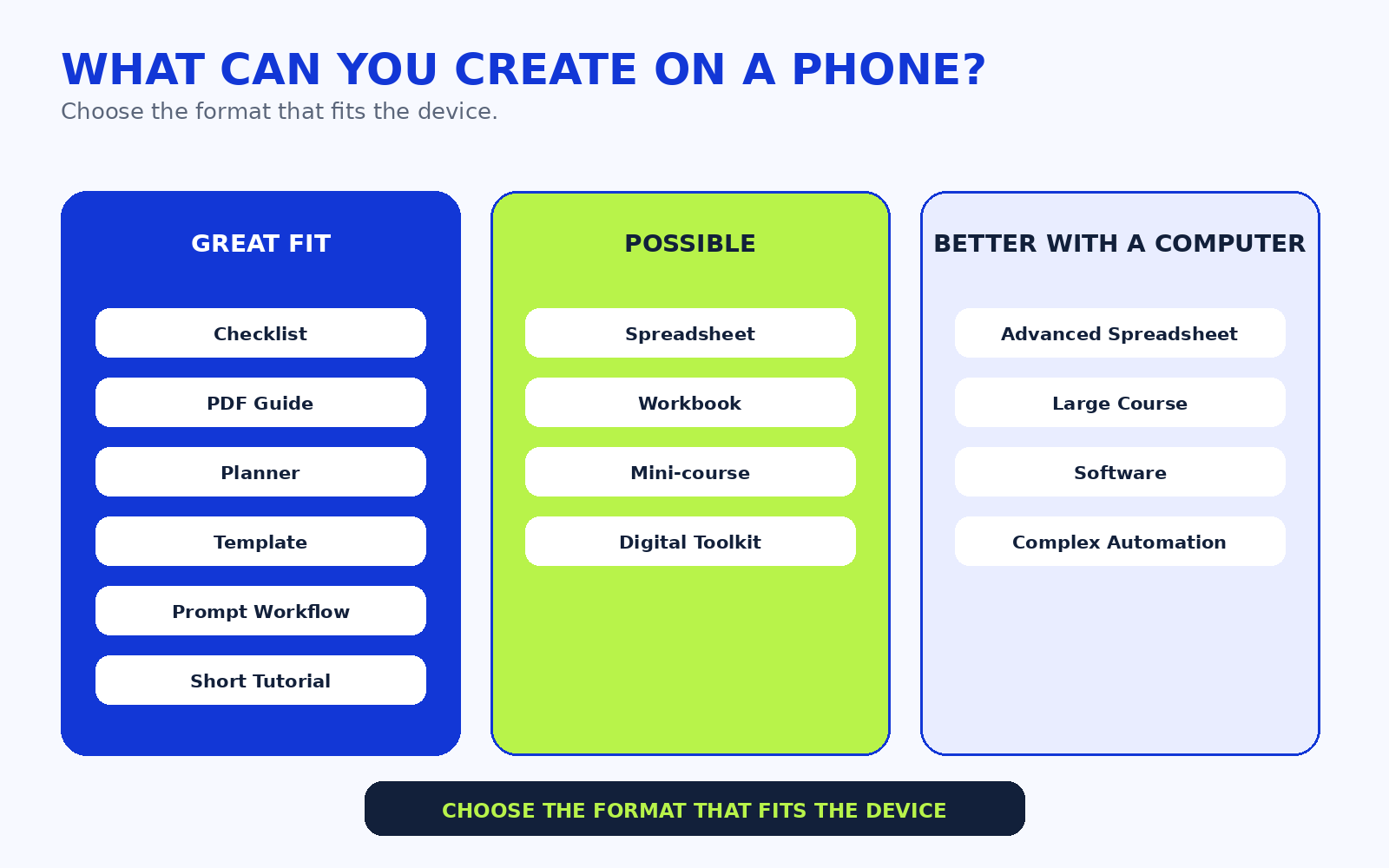 Choose the format that fits the device instead of forcing every idea into a phone-only workflow.
A checklist is ideal when users forget steps. A small-business opening checklist can be drafted in Docs or Notes, designed in a mobile design app and exported as PDF. The common mistake is making it too generic. Test it by asking a real user to complete the task with the checklist.
A worksheet guides a decision or exercise. A freelancer client-discovery worksheet can help a beginner ask better questions before starting work. It is phone-friendly because the structure is simple and exportable.
A focused guide such as “Beginner WhatsApp Business Setup for a Small Retail Shop” is more practical on a phone than a huge book. Draft, edit, design, export and test the PDF before publishing.
A mini ebook goes deeper than a checklist but should stay narrow. Short chapters, clear headings and examples are easier to manage on mobile than a 300-page manuscript.
Study, content and business planners are suitable when the planning structure itself creates value. Keep writing space, page size and mobile readability in mind.
Social posts, flyers, presentations and simple business graphics can be designed on mobile. Licensing matters: Canva allows commercial design uses under its current licence, but you cannot simply resell Canva content as standalone assets, and Pro Content has additional conditions for templates.
Budget trackers, sales logs, expense sheets and content trackers work well if formulas remain manageable. Google Sheets on Android can create, edit and export spreadsheets, including PDF, but very large files may be constrained by device memory.
A useful AI product is not a dump of generic prompts. It should specify the use case, variables, process, example inputs, expected outputs and limitations.
These work when selection and organization save the user time. Respect copyright: linking to resources is not the same as owning or redistributing them.
A workbook combines instruction and exercises. Keep page layouts simple enough to edit and test from your phone.
Android and iPhone both support screen recording, and mobile video editors make short tutorials practical. A ten-minute walkthrough is a better first project than a four-hour course.
A phone can record audio, but environment matters. Use a quiet room, test volume and remove obvious noise before delivery.
A toolkit combines connected resources—a checklist, template and short guide, for example. It is a strong phone-first format when each component is simple.
| Product | Phone Creation Difficulty | Best Mobile Tool Type | Design Needed | File Size | Testing Difficulty | Laptop Eventually Helpful? | Beginner Suitability |
|---|---|---|---|---|---|---|---|
| Checklist | Very Easy | Docs/design | Low | Small | Easy | No | High |
| Worksheet | Very Easy | Docs/design | Low | Small | Easy | No | High |
| PDF guide | Easy | Docs/design | Moderate | Small–Medium | Easy | Sometimes | High |
| Mini ebook | Easy | Docs/design | Moderate | Medium | Easy | Helpful | High |
| Planner | Easy | Design app | Moderate | Medium | Easy | No | High |
| Canva template | Easy | Design app | High | Small | Moderate | No | High |
| Simple spreadsheet | Moderate | Spreadsheet app | Low | Small | Moderate | Helpful | High if skilled |
| Tracker | Easy | Spreadsheet/Notion | Low | Small | Easy | No | High |
| Prompt workflow | Easy | Docs + AI | Low | Small | Moderate | No | Medium–High |
| Swipe file | Very Easy | Docs/Notion | Low | Small | Easy | No | High |
| Resource list | Very Easy | Docs/Notion | Low | Small | Easy | No | High |
| Workbook | Moderate | Docs/design | Moderate | Medium | Moderate | Helpful | High |
| Short tutorial | Easy | Screen recorder/editor | Moderate | Medium–Large | Moderate | No | High |
| Mini-course | Moderate–Difficult | Video/editor | High | Large | Moderate | Yes | Medium |
| Digital toolkit | Moderate | Multiple apps | Moderate | Medium | Moderate | Helpful | High |
| Advanced spreadsheet | Difficult | Spreadsheet app | Low | Medium | Difficult | Yes | Low |
Research search results, social comments, Reddit, Facebook or WhatsApp communities where appropriate, customer conversations, reviews, freelance requests and questions people already ask you. Use PERSON → PROBLEM → CURRENT SOLUTION → FRICTION. Start with “Who needs help, and what are they trying to do?” rather than “I want to make an ebook.”
Match user action to format: forget steps → checklist; need instructions → guide; need organization → planner; need calculations → spreadsheet; need repeated design → template; need demonstration → tutorial; need several connected resources → toolkit.
Search, interview potential users, read comments and reviews, create a poll or form, share a mockup, make a waitlist, give away a small sample or run a paid pilot where appropriate. VEZILL's digital-product validation guide is the natural next reference.
Product Name: ______
Audience: ______
Problem: ______
Outcome: ______
Format: ______
Sections: ______
Tools: ______
Validation Evidence: ______
Delivery Method: ______
Price Hypothesis: ______
What Is Not Included: ______
Text: Notes/Docs → outline → draft → edit → format. Visual: design app → layout → mobile readability → export. Spreadsheet: structure → formulas → test. Video: camera/screen recorder → edit → captions → export. Audio: quiet recording → edit → export.
Imagine a beginner creator helping small businesses that repeatedly struggle to plan posts. First, they interview three owners and confirm that planning consistency is a real problem. Next, they draft content categories in a mobile document, create a simple planner in a design app, export PDF, open it on a second phone, ask users to complete one week, revise confusing sections, upload the product and create short promotional demonstrations.
This is hypothetical. The important lesson is that the phone is not the business model—the validated problem is.
Use this workflow: Draft → Format → Proofread → Export PDF → Open PDF → Test Links → Test on Another Device → Compress if Necessary → Upload.
Check page size, margins, font size, image resolution, clickable links, compression, file naming and version numbers. Canva currently documents PDF downloads on mobile, while Google mobile tools can create and download files. Always reopen the exported file rather than assuming export worked.
Canva's mobile app is available on iOS and Android and supports mobile PDF downloading. It is suitable for planners, worksheets, presentations, social templates and short guides. Keep layouts simple, use readable type and test the final export on a phone.
Licensing matters. Canva's current guidance says products for sale must be original designs; Canva content cannot simply be resold as standalone content. Pro Content also has specific restrictions and template conditions. Check the current licence for your exact use case before selling.
Use Idea → Outline → Draft → Headings → Examples → Editing → Design → PDF. Google Docs on Android supports creating and editing documents, including offline access. Short focused guides are much easier to manage than very large manuscripts.
Yes, simple ones. Budget trackers, content trackers, sales logs, study trackers and expense sheets are realistic. Google Sheets on Android can create, edit and export spreadsheet files, including PDF. Complex formulas, macros, large datasets and advanced dashboards are better tested on a computer.
Use your phone camera or native screen recorder, record clear audio, edit, add captions, export and test playback. Android and iPhone both provide screen-recording capabilities, while mobile editors such as CapCut are available on both major mobile platforms. A short tutorial or software walkthrough is a realistic first product; a large professional course is much heavier.
AI can support product ideation, audience questions, outlining, drafting, rewriting, examples, editing, descriptions, FAQs, formula assistance, design briefs, validation questions and marketing ideas. ChatGPT and Gemini have current mobile apps, so AI-assisted workflows can happen directly from a smartphone.
HUMAN → AI → HUMAN REVIEW
The human provides experience, evidence, judgment and testing. AI provides speed, organization and drafting assistance. The human then checks accuracy, originality, usefulness, safety, licensing and context.
Product Idea Prompt: Interview me to discover one digital product I can realistically create using only my smartphone. Ask about my skills, experience, audience access, tools and limitations. Do not invent demand. Validation Prompt: Create 10 neutral customer interview questions that test whether this problem exists without leading the interviewee toward my solution. Editing Prompt: Review this product draft for clarity, repetition, unsupported claims, missing beginner steps and instructions that are difficult to follow on a phone.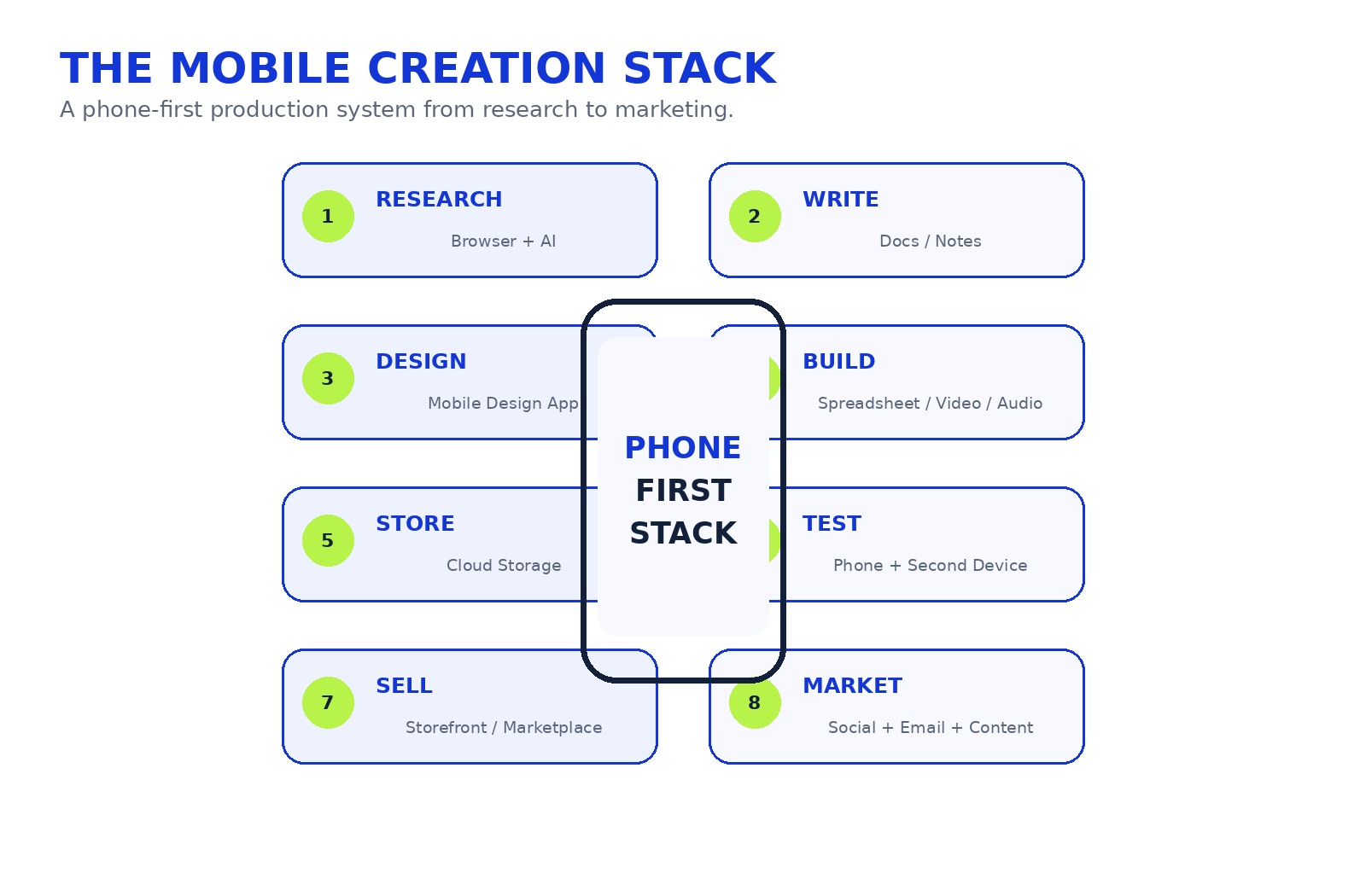 A phone-first product workflow depends on a simple production stack, not one magic app.
Create a folder named after the product with subfolders for Research, Draft, Images, Final, Marketing, Customer Version and Archive. Use version names such as product-v1.0.pdf instead of “final-final-new2.pdf.” Keep a cloud backup and, where practical, an offline copy. Never overwrite your only master file.
Before selling, open the product on your phone, test another device where possible, click every link, check fonts, images, page breaks, formulas, audio/video, file size, spelling and instructions. Then ask another person to use it without your help. If they cannot figure out what to do, your product probably needs clearer instructions.
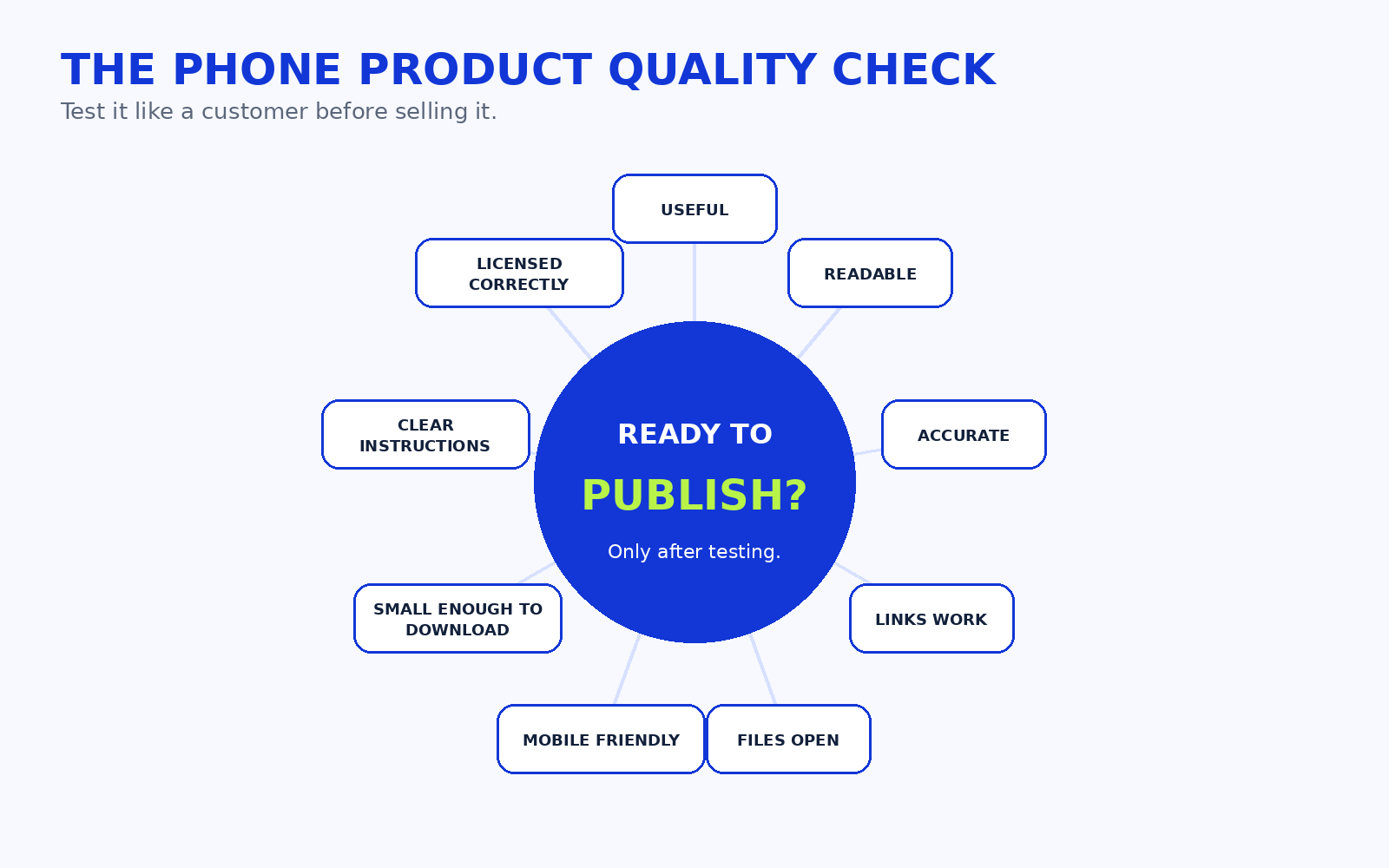 Test the product like a customer before you sell it.
Phone-first creators should design for real connection constraints. Large uploads consume time and data. High-resolution images increase file size. Video can fill device storage quickly. Use compression thoughtfully, keep backups and avoid assuming every customer has unlimited high-speed internet.
Design for the customer's device and connection, not only your own.Publishing options include digital marketplaces, creator storefronts, ecommerce platforms, personal websites, cloud delivery and email delivery. Evaluate file hosting, checkout, payment availability, automated delivery, refunds, licences, tax obligations and updates. No platform guarantees customers.
For marketing, your phone is strong: WhatsApp, TikTok, Instagram, Facebook, YouTube Shorts, X, LinkedIn, email, communities and SEO content can all support distribution. VEZILL's digital-product marketing guide expands on audience and distribution. Use SHOW THE PROBLEM → SHOW THE PRODUCT → SHOW HOW IT HELPS rather than repeating “buy my product.”
Phone-only creation works best when you separate the project into small stages instead of trying to research, write, design and publish inside one app. A simple production system also reduces the risk of losing files or creating a beautiful product that has never been tested.
Start by collecting evidence rather than immediately generating content. Save useful questions, screenshots, links and notes in one research folder. If you use AI, summarize what you have learned only after checking the original sources. A useful research note should distinguish between what users actually said, what you observed and what you are assuming. This matters because a product built from assumptions can look polished while solving nothing important.
Do not design every page while you are still deciding what the product should say. For a guide, checklist or workbook, draft the raw content in a writing app first. Use headings, short sections and placeholder notes such as “[add example here]” or “[insert screenshot]”. Once the content works, move to visual formatting. On a small screen this separation saves time because editing styled pages repeatedly can become frustrating.
If you are creating the product on a phone, you have one advantage: you immediately see what crowded mobile design feels like. Use generous spacing, short paragraphs, strong contrast and larger type. Avoid putting five tiny columns into a page simply because a desktop template allows it. If customers will download the product on their phones, design for that reality.
Keep the editable source separate from the customer-ready file. Your master might remain in Docs, Canva, Sheets or another app. The customer version might be a PDF, spreadsheet copy, template link, video or ZIP. This prevents accidental changes to the master and makes updates easier.
Do not test only the editable project. Download or export the exact final file and use that. Open every link. Scroll every page. Enter sample numbers into the spreadsheet. Play the full video. Check whether instructions still make sense when the customer cannot message you immediately. A product can work perfectly inside the creation app and still break after export.
Delivery is part of the product experience. A good file with confusing access instructions creates unnecessary support work.
Before publishing, decide exactly what the customer receives. A PDF product might include one main PDF and a short read-me page. A spreadsheet might include the working file plus a one-page setup guide. A template could include the template access instructions and a licence summary. A video product may require a private hosting link instead of a huge direct download.
Use clear file names such as 30-day-content-planner-v1.pdf instead of final-new-copy-3.pdf. If several files belong together, package them logically and explain what each file does. Keep a copy of the version customers received so that support questions can be answered against the correct release.
If you later update the product, record what changed. A simple changelog—“Version 1.1: fixed broken link, clarified page 6 instructions, added Android example”—helps you manage updates professionally even from a phone.
A smartphone makes publishing promotional content easy, but ease can encourage creators to post the same sales message everywhere. A better approach is to demonstrate the problem and the product in context.
For a spreadsheet, record a short screen demonstration showing the messy manual process first, then show how the tracker organizes it. For a planner, show one page being used rather than displaying only a mockup. For a guide, turn one useful idea from the guide into a short educational post and explain that the full resource contains the complete workflow.
Use different channels for different jobs. WhatsApp may work for direct conversations and existing contacts. Instagram, TikTok and YouTube Shorts are useful for demonstrations. LinkedIn may suit professional templates, career resources and business tools. Search-focused blog posts can answer specific questions people already ask. Email is useful for people who have deliberately subscribed. The goal is not to be everywhere; it is to choose a few channels where your intended customer already pays attention.
Track signals that indicate real interest: people asking for the link, downloading a sample, joining a waitlist, asking compatibility questions, requesting a version for their situation or buying. Views and likes may help distribution, but they are weaker evidence than user action.
Phone-first creation can be practical where a smartphone is already the main device used for research, communication and payments. Local ideas might include a Kenyan small-business sales tracker, a student planner, freelancer client tracker, church event toolkit, small-farm record sheet or WhatsApp Business content planner. Kenyan creators can also build for global customers in freelancing, productivity, design, education, AI workflows and technology.
Do not assume every customer has unlimited data or the same apps. Offer sensible file sizes and clear compatibility instructions.
Problem: assignment deadlines are scattered. Audience: first-year students. Product: assignment tracker. Tools: mobile spreadsheet. Workflow: research → build → test. Validation: ask classmates to use it. Delivery: spreadsheet/PDF. Mobile limit: advanced formulas. Upgrade: desktop dashboard later.
Problem: learners need practice on one concept. Audience: beginners. Product: worksheet + solution guide. Tools: Docs/design app. Validation: pilot one lesson. Delivery: PDF. Limit: large books. Upgrade: course later.
Problem: small businesses post inconsistently. Product: 30-day content planner. Tools: Docs + design app. Validation: test with businesses. Delivery: PDF/template. Limit: large asset libraries. Upgrade: full toolkit.
Problem: client onboarding is chaotic. Product: onboarding checklist + questionnaire. Tools: Docs/forms. Validation: test on real projects. Delivery: PDF/doc. Limit: complex automation. Upgrade: no-code client portal.
Problem: repeated customer questions. Product: response template pack. Tools: Notes/Docs. Validation: compare common enquiries. Delivery: document. Limit: support automation. Upgrade: customer-service system.
Problem: seasonal costs are hard to review. Product: simple farm record tracker. Tools: Sheets. Validation: test on a real weekly routine. Delivery: spreadsheet. Limit: advanced analytics. Upgrade: desktop dashboard.
Problem: microbusiness owners repeatedly recreate promotions. Product: editable social template set. Tools: mobile design app. Validation: let non-designers customize it. Delivery: template link/file. Limit: precise large-format design. Upgrade: desktop brand kit.
Problem: action items disappear after meetings. Product: meeting tracker. Tools: Sheets/Notion. Validation: test with small teams. Delivery: template. Limit: complex integrations. Upgrade: workflow system.
Complex SaaS, advanced software, heavy coding, large databases, complex financial models, advanced Excel automation, high-end motion graphics, large professional courses and complex web design are usually better on a computer. Starting with a phone does not mean remaining phone-only forever.
STARTING TOOL → VALIDATION TOOL → SALES TOOL
Do not resell images, fonts, Canva assets, music, templates, course material, employer documents, client information, screenshots, logos, books or downloaded PDFs simply because they are saved on your phone.
Being able to save something to your phone does not give you the right to resell it.Use original work, review licences and remove confidential information. VEZILL's work-experience-to-digital-product guide explains how to separate general lessons from protected employer material.
Pricing depends on usefulness, problem importance, audience, alternatives, time saved, specificity, quality, support, updates, licensing, proof and complexity. Customers care about whether the product solves the problem—not which device created it.
☐ One audience
☐ One problem
☐ One product idea
☐ Evidence the problem exists
☐ Product format
☐ Creation app/tool
☐ Backup/storage
☐ Testing plan
☐ Delivery method
☐ Basic marketing plan
☐ Licensing check
☐ Customer instructions
This challenge is for a small beginner product, not every possible digital product.
Objective: identify one repeated issue. Actions: search, observe and ask. Tools: browser, notes, AI. Evidence: repeated questions or complaints. Avoid: choosing a format first. Output: problem statement.
Actions: interview users, read reviews, test a poll. Evidence: actual behavior. Avoid: relying on compliments. Output: validation decision.
Actions: run the Phone-First Test and outline only essential sections. Output: product brief.
Actions: draft or build the core utility. Avoid: bonuses and feature creep. Output: testable version.
Actions: improve readability, branding, file names and customer instructions. Output: customer-ready draft.
Actions: open on another device, test links and ask someone to use it independently. Output: corrected version.
Actions: upload, create a clear product description and demonstrate the problem/solution. Output: published product plus first distribution actions.
Yes, especially checklists, PDF guides, planners, simple templates, trackers and short tutorials. Advanced products may be much easier on a computer.
A checklist, worksheet or simple PDF guide is usually easy to prototype, but usefulness matters more than ease.
Yes. A focused ebook can be drafted, edited, designed and exported from mobile tools, although very long manuscripts are less comfortable.
Yes. Mobile document and design tools can export PDFs. Always reopen and test the finished file.
Yes, but follow Canva's current content licence and template rules, especially where Pro Content is involved.
Yes for simple trackers and formulas. Advanced spreadsheets are usually easier to build and test on a computer.
A short mini-course is possible, but large video courses create storage, editing and file-management challenges.
AI can assist, but you remain responsible for the problem choice, accuracy, originality, testing, licensing and final usefulness.
Yes, if your chosen selling platform and payment workflow work adequately on mobile and the product itself is phone-friendly.
You can validate and create some products using existing or free tools, but internet/data, fees, taxes, storage or paid features may still create costs.
Yes, but check the current payment, marketplace, tax and delivery requirements of the platform you choose.
When your product requires complex spreadsheets, heavy video editing, software development, large file management or when mobile limitations are slowing work that has already shown evidence of value.
A person with a real problem does not care whether you made the solution on a premium laptop or an ordinary smartphone. They care whether the product is useful, accurate and easy to use.
PERSON → PROBLEM → USEFUL SOLUTION → PHONE-FRIENDLY FORMAT → VALIDATE → CREATE → TEST → DELIVER → DISTRIBUTE → IMPROVE
You do not need to wait for perfect equipment. You can use the phone you already have to test and create something small and useful—provided you build it properly.
Discover more articles you might be interested in
Learn where to find reliable step-by-step guides online, how to choose the right tutorial for your task, check whether it is current and follow instructions safely.
By Davie
Stop searching broad topics and start finding the exact knowledge you need. Learn how to define your problem, search smarter, choose reliable sources, verify answers and take action.
By Davie
Quick Knowledge or an online course? Learn when a focused answer is enough, when structured learning is better, and how to choose the right learning depth for your goal.
By Davie

Learn how to turn one useful digital product into multiple income streams through premium versions, bundles, courses, licensing, services, subscriptions, B2B sales and complementary products.
By Davie
Get the updates, on newly released, popular & fast-moving MRR digital products
Up to Top
Comments All
Antony
@antony
You really don’t need a laptop or fancy setup to get started with digital products. The idea of creating everything from just a phone makes it feel much more doable, especially for someone starting with what they already have. 📱
September 17,2026 At 05:34 PM