
You do not always need to master an entire subject before you can complete one useful task. A well-matched how-to guide can narrow a large body of knowledge to the actions, checks and context you need right now—then become a starting point for deeper skill.
Suppose you need to create a PivotTable before a meeting. “Learn Excel” is far too large. Even “learn data analysis” is broader than your immediate problem. Your actual task may be: create a PivotTable in Microsoft 365 that shows monthly sales by product.
That change in wording matters. It turns an open-ended learning project into a bounded outcome. You can identify the correct tool, find instructions for the current interface, complete the task, check the result and repeat it with another dataset.
Don't learn everything before doing something. Learn enough to do the next thing correctly.
How-to guides can be one of the fastest ways to learn a specific, bounded task because they reduce the amount of information you need to process before taking action. Instead of studying an entire subject, you focus on one outcome, follow the relevant procedure, verify the result and repeat the task until you can perform it with less assistance. They work especially well for practical tasks with a clear beginning and end. Broader skills and professions still require foundations, varied practice, feedback, judgment and experience.
SPECIFIC PROBLEM → TARGETED GUIDE → ACTION → CHECKPOINT → RESULT → REPEAT → SKILL
Sometimes you do not want to assemble an answer from ten tabs, a long course and several disconnected videos. You want the useful knowledge already organized around the thing you need to do.
That is the role VEZILL is building as a practical knowledge hub: focused digital products that package useful knowledge into an accessible format you can learn from and apply. Instead of assuming every problem needs weeks of study, VEZILL is designed around Quick Practical Knowledge: Access → Learn → Apply.
MASTER WHAT YOU NEED TO KNOW IN A DAY OR LESSThe goal is focused learning: practical explainers and digital resources that may take roughly 20–90 minutes to consume where the product format supports it, so you can understand the essentials and move to application instead of staying in learning mode indefinitely.
This does not mean every subject can be mastered in 90 minutes or every VEZILL product has the same length. Complex skills, regulated work and professions still need deeper education and practice. The promise is narrower: when your need is specific, look for a resource that packages the relevant knowledge without unnecessary detours.
Just learn what you need. Apply it. Return when the next problem appears.
Explore VEZILL as a practical knowledge hub or browse VEZILL's digital products and practical guides.
A how-to guide is a focused set of instructions designed to help someone complete a defined task or produce a defined result. It may be written, visual, video-based, interactive or AI-assisted. The important feature is not the format; it is the bounded outcome.
A reference page may tell you what a feature does. A course may teach the broader field. A quick answer may give one fact. A how-to guide connects actions in a useful sequence so that you can move from a starting state to a finished state.
This fits VEZILL's broader idea of Quick Knowledge: start with what a person is trying to do, then organize the knowledge around that outcome rather than making the learner consume an entire subject first.
Broad SubjectLearn Excel Skill AreaSpreadsheet data analysis Specific TaskCreate a PivotTable showing monthly sales by product
The same distinction applies elsewhere. “Learn WordPress” is broad; “change the spacing between two blocks on my homepage” is a task. “Learn graphic design” is broad; “remove a product-photo background and export a transparent PNG” is a task.
The narrower the desired outcome, the easier it becomes to search for relevant instructions—but high-consequence tasks still require enough context to act safely.
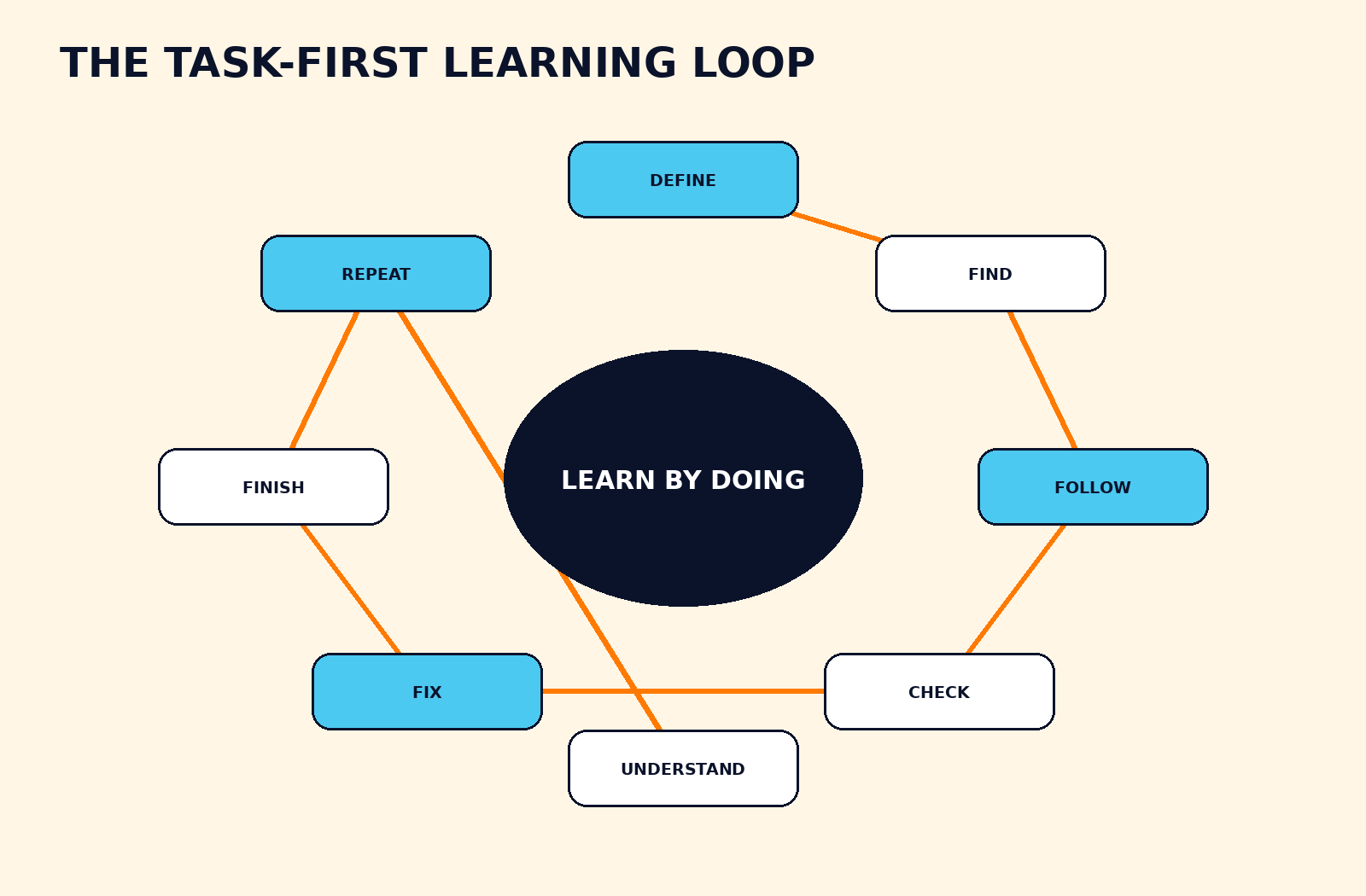 The VEZILL Task-First Learning Loop: execution becomes learning when you check, repeat and understand.
A useful how-to guide should not end at “I copied the steps.” Use this eight-stage loop to convert a tutorial into practical capability.
This is task-first learning rather than task-only learning. The task gets you moving; repetition and explanation build independence.
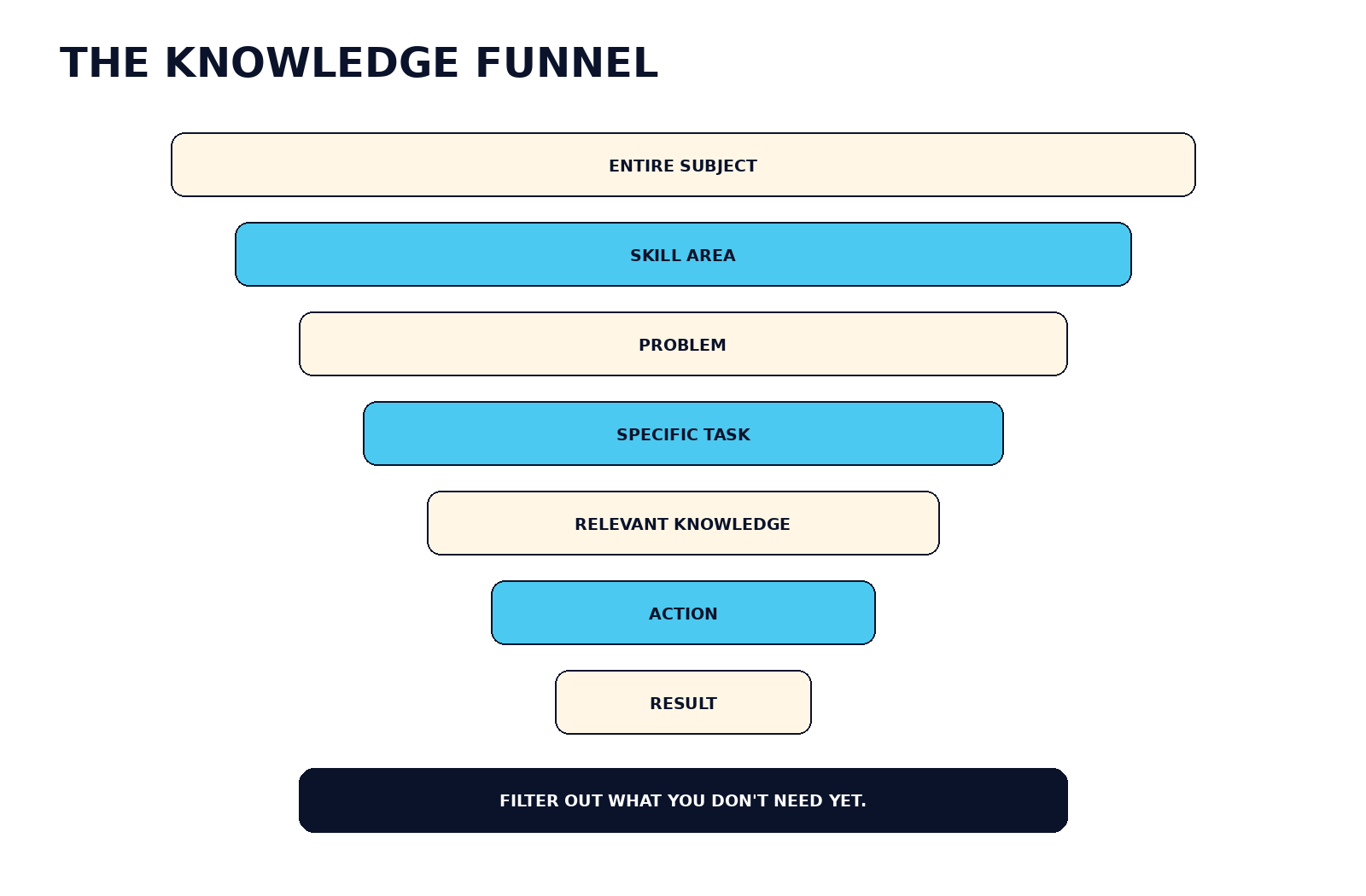 A good how-to guide filters a large subject down to the knowledge needed for the current outcome.
A broad subject contains many concepts that may be valuable later but irrelevant to today's task. A targeted guide acts like a filter. It can reduce unnecessary background reading, search space, decision overload, irrelevant theory, uncontrolled trial and error, and uncertainty about sequence.
Instead of confronting 100 things I could learn, the learner sees the few things I need for this task. That does not make the omitted knowledge useless. It simply postpones it until the task or the learner's goals require it.
Worked examples and guided practice are especially useful for novices because beginners do not yet have the mental models that experienced people use to decide what matters. But execution alone is not enough. To transfer the learning, the learner needs opportunities to retrieve, repeat, vary and explain what they did.
How-to guides optimize for execution. Courses optimize more strongly for broader understanding and capability. Both have a purpose.
| Format | Best For | Depth | Speed to First Action | Context | Practice | Main Weakness |
|---|---|---|---|---|---|---|
| Quick Answer | One immediate question | Very low | Very fast | Low | Low | Can lack context |
| How-To Guide | Specific task | Focused | Fast | Medium–high | Immediate | May teach procedure without broader understanding |
| Documentation | Accurate product/reference information | Variable | Medium | Technical | Variable | May assume prior knowledge |
| Video Tutorial | Visual procedure | Focused | Fast | High visually | Immediate | Harder to scan and update |
| Course | Broader capability | Deep | Slower | Structured | Usually higher | Larger time commitment |
| Mentor/Expert | Complex contextual problems | Adaptive | Variable | Very high | High | Availability and cost |
The table is qualitative, not a scientific ranking. A two-minute official support article may be better than a forty-minute video; a difficult task may require a course before any tutorial is safe to follow.
A how-to guide is strongest when the task has a clear result, limited scope, identifiable prerequisites and a reasonable way to check success. Examples include creating a PivotTable, exporting a Canva design correctly, changing a phone setting, configuring a WordPress feature, creating an email filter, using a specific spreadsheet formula, making a simple chart, editing one video effect, creating a Google Form, configuring an analytics event, installing a software package, resizing an image or building a simple automation.
These are bounded tasks. You can usually describe what “done” looks like. That makes it possible to select relevant instructions and verify the result.
“Become a cybersecurity professional,” “become a good accountant,” “understand investing,” “become a software developer” and “become a professional designer” are not single tasks. They require connected knowledge, repeated practice, feedback, judgment and experience. Some also operate in regulated or high-consequence environments.
TASK ≠ SKILL ≠ PROFESSION
A tutorial can help you perform one task. Repeated, varied tasks can contribute to a skill. A profession requires a much wider body of competence and judgment.
If you notice that your “one task” keeps exposing adjacent gaps, that is useful information. You may have crossed the boundary where structured learning becomes more efficient than collecting isolated tutorials. VEZILL's guide to skills you can learn online and develop into a business capability shows how broader capability connects to practice, proof and real problems.
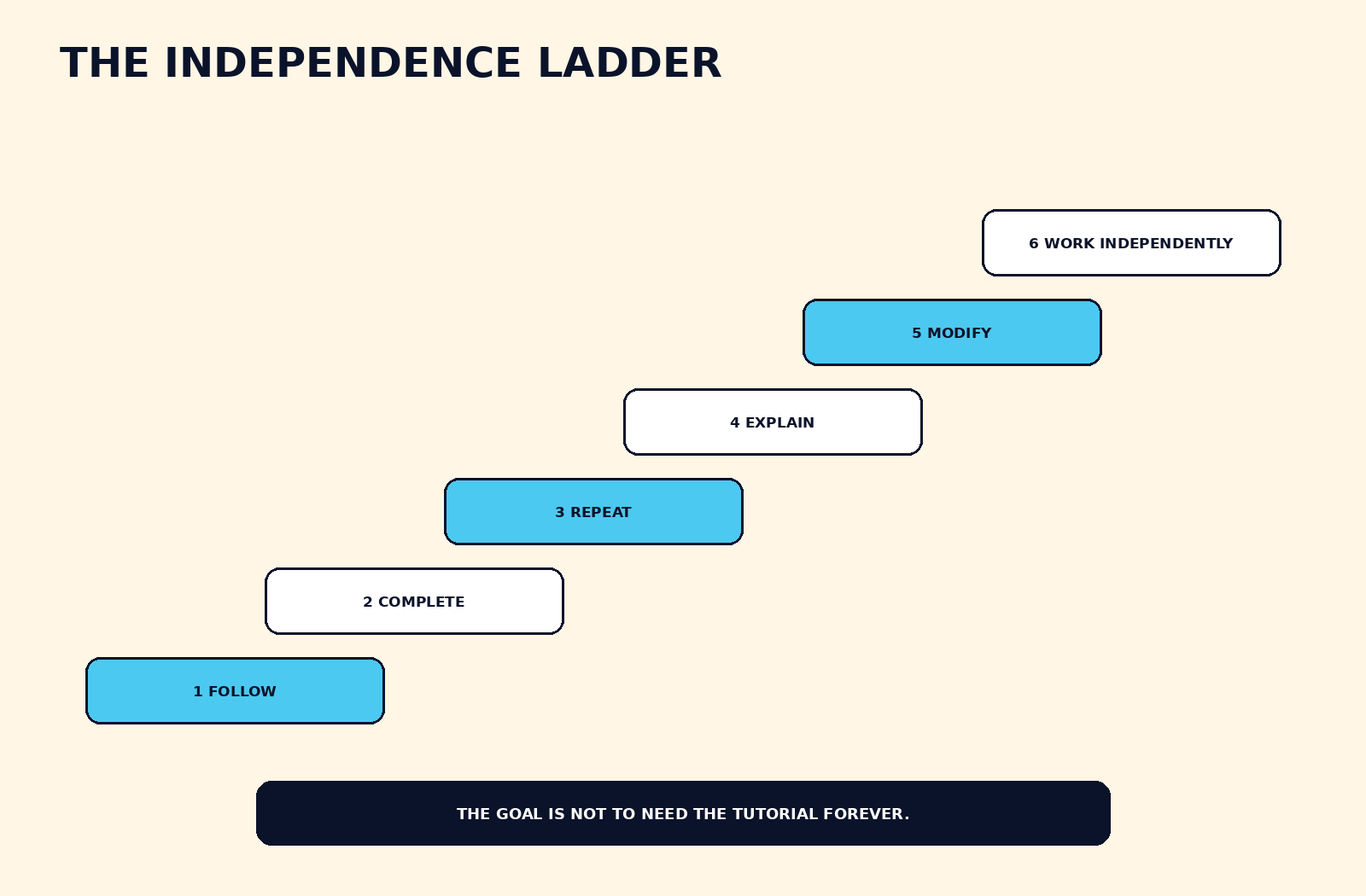 The goal of a tutorial is not permanent dependence; it is increasing independence.
A tutorial can create an illusion of competence because every decision has already been made for you. You watch, copy, complete, forget and search again. The finished result is real, but your ability to reproduce or adapt it may be weak.
WATCH → COPY → COMPLETE → FORGET → SEARCH AGAIN
A better progression is:
FOLLOW → COMPLETE → REPEAT → EXPLAIN → MODIFY → PERFORM WITHOUT GUIDE
Use the Independence Ladder as a self-test. Level 1: you can follow the guide. Level 2: you complete the task with occasional reference. Level 3: you can do it without the guide. Level 4: you understand why the important steps work. Level 5: you can adapt the process when circumstances change. Level 6: you can troubleshoot and explain the process to someone else.
Finishing the tutorial is not the same as learning the task.
First attempt: follow the guide carefully and verify the result. Second attempt: repeat the task while referring to fewer instructions. Third attempt: try from memory. Fourth attempt: change an important input so you cannot simply reproduce the same clicks.
If the first tutorial used one sales dataset, create the PivotTable with a different dataset. If you followed a Canva poster tutorial, design a different layout with different content. If you built an automation with one trigger, change the trigger and predict what else must change.
Then explain the process. What did Step 3 change? Why was Step 4 necessary? What would happen if you skipped it? Which steps are universal? Which depend on the specific tool?
This is where copying begins to become understanding. If you want to turn that capability into honest evidence, VEZILL's guide to building a portfolio without professional experience explains how to use self-initiated projects without presenting them as paid client work.
Do not wait until the final step to discover that Step 2 failed. Use a rhythm of ACTION → EXPECTED RESULT → CHECK → CONTINUE. For example: create the PivotTable; checkpoint: the field panel should appear. Drag “Product” to Rows; checkpoint: product names should now appear vertically.
If the checkpoint fails, stop. A guide that continues does not mean your workflow should.
This is a practical heuristic, not a scientific claim that everything can be learned in fifteen minutes. Before committing to a full course, spend a short initial period clarifying five questions: What exact task am I trying to complete? Can a reliable guide solve it? Do I understand the prerequisites? Is the task low-risk enough to learn this way? Am I repeatedly encountering related tasks?
If one reliable guide solves a bounded problem, use it. If the task immediately exposes missing foundations or repeated adjacent problems, consider deeper learning. The point of the heuristic is to diagnose the size of the learning problem before buying or starting a much larger program.
Use the structure:
ACTION + OBJECT + TOOL + VERSION + CONTEXT
“Excel help” is weak. “Create PivotTable Excel Microsoft 365 from sales data” is far more specific. “WordPress spacing” is weak. “Change paragraph spacing WordPress block editor current version” narrows the interface. “Canva PDF” is weak. “Export Canva design PDF Print with bleed” identifies the output.
Precise queries reduce irrelevant results because they expose the action, object and environment. When instructions depend on a provider, country or account type, include that context too.
A useful guide should ideally tell you what you will accomplish, prerequisites, required tools, starting state, platform or version, the actual steps, expected results, important warnings, troubleshooting options, the final result, how to verify success and when the information was last updated.
Use official documentation when current product behavior matters. Use a tutorial to translate difficult documentation into a beginner-friendly sequence. Use community discussions for edge cases, not automatic authority. For high-consequence tasks, raise the verification standard.
Written guides are excellent for commands, formulas, settings, configuration and reference because you can scan, search and copy exact text. Video is often better for physical procedures, visual interfaces, design workflows, editing and movement because you can see what the instructor sees.
VIDEO TO SEE → TEXT TO FOLLOW → CHECKLIST TO REPEAT
A hybrid approach is often practical: watch the visual demonstration once, use written steps during execution, then create a short checklist for repetition.
Traditional tutorials are mostly fixed: an author publishes one sequence and every reader receives the same explanation. AI assistants can adapt explanations, answer follow-up questions, work with uploaded material in supported contexts and break a process into smaller steps. Current ChatGPT Study Mode is designed to ask questions, guide thinking, explain step by step and check understanding; Google's Guided Learning in Gemini similarly emphasizes questions, step-by-step breakdowns and multimodal learning.
TRADITIONAL: AUTHOR → FIXED INSTRUCTIONS → READER
AI-ASSISTED: GOAL → INSTRUCTION → USER RESULT → QUESTION → ADAPTED INSTRUCTION
That interactivity is useful, but it does not turn AI into automatic authority. AI can still invent menu items, use outdated interfaces, generate incorrect commands, misunderstand screenshots, skip prerequisites or overlook risk. Current official documentation remains important for changing products and consequential actions.
AI is an interactive guide—not automatic authority.
I want to accomplish [specific task].
I am using [tool/device/software].
My version is [version if known].
My current starting point is [context].
Guide me one step at a time. After each important step, tell me what I should expect to see, give me a checkpoint, warn me before anything destructive or irreversible, and wait for confirmation before continuing. If the instructions may have changed, tell me what I should verify with the official source.
A failed step can reveal what the tutorial assumed. Write down the expected result and the actual result. If the guide says “Connected successfully” but you see “Authentication failed,” your next problem is no longer “how do I connect this?” It is “why is authentication failing in this exact environment?”
ERROR → OBSERVE → IDENTIFY DIFFERENCE → RESEARCH → TEST → UNDERSTAND
This does not justify uncontrolled experimentation. When a change can delete data, affect security, interrupt a business system or create financial consequences, use reversible tests, backups and authoritative guidance.
After successfully completing a task you expect to repeat, save the task, tool, version, source, steps, checkpoints, errors encountered, solution and last verified date. Keep the record short enough to use.
SEARCHED KNOWLEDGE → PERSONAL KNOWLEDGE → REUSABLE SYSTEM
Over time, repeated notes can become a checklist or SOP. First time: follow someone else's instructions. Second time: improve your notes. Third time: standardize the process. Eventually: HOW-TO GUIDE → CHECKLIST → SOP → REPEATABLE WORKFLOW.
Sometimes—but only after the creator genuinely understands the process and has the right to share it. A repeatedly tested method can become an original guide, checklist, template, worksheet, SOP, tutorial, mini-course or toolkit. That does not mean copying someone else's tutorial, changing the design and selling it.
If the process comes from genuine experience, VEZILL's article on turning work experience into a digital product explains how to separate useful general lessons from confidential or employer-owned material. The companion guide on identifying valuable knowledge you already have is useful for finding repeated problems and methods worth documenting.
AI can help organize or edit your material, but it should not manufacture expertise. VEZILL's AI-assisted digital-product workflow and article on what you can create and sell online using AI both emphasize problem-solving, verification and original value rather than generation for its own sake.
Task-first learning is particularly useful when someone needs to complete a practical digital or administrative action: use an Excel feature, set up a WordPress page, create a Canva asset, work in Google Workspace, configure a marketing tool, complete an ecommerce workflow or understand a smartphone feature.
But local procedures need local authority. A US or UK tutorial may be perfectly useful for a universal software feature and completely inappropriate for Kenyan tax, business registration, payment systems, government services, banking or regulation. For eCitizen, KRA, M-Pesa and similar procedures, start with the responsible Kenyan authority or provider and use third-party tutorials only as explanation.
The same principle applies across Africa: countries have different laws, tax systems, payment infrastructure and government portals. “Africa” is not one administrative environment.
How-to guides should not be treated as professional qualification for medical treatment, electrical work, structural repairs, legal decisions, tax decisions, investment decisions, high-risk cybersecurity operations, vehicle safety systems or dangerous machinery.
HIGHER CONSEQUENCE = HIGHER VERIFICATION
The more serious the cost of being wrong, the stronger the source, competence, supervision and professional review should be.
| Specific Task | Best Learning Format | Complexity | Guide Enough? | When Deeper Learning Is Needed |
|---|---|---|---|---|
| Create an Excel PivotTable | Written + video | Low | Usually | When analysis becomes recurring or complex |
| Use XLOOKUP in Excel | Written | Low | Usually | When data modelling becomes broader |
| Create a Google Form | Written + visual | Low | Usually | When workflow logic or compliance matters |
| Build a chart in Sheets | Written | Low | Usually | When interpretation becomes analytical |
| Remove image background | Video | Low | Usually | When professional design judgment is required |
| Export Canva for print | Written + visual | Low | Usually | When commercial print specs become complex |
| Resize an image | Written | Low | Usually | When resolution/color management matters |
| Edit one video transition | Video | Low | Usually | When editing becomes a broader craft |
| Change WordPress block spacing | Visual | Low | Usually | When theme/CSS architecture matters |
| Connect a custom domain | Official guide | Medium | Often | When DNS/email setup is complex |
| Install a software package | Official docs | Medium | Often | When dependencies conflict |
| Create a Git branch | Docs + practice | Low | Usually | When team workflows become complex |
| Read a CSV in Python | Docs + example | Low | Usually | When programming fundamentals are missing |
| Fix one Git error | Docs + troubleshooting | Medium | Sometimes | When repository state is unclear |
| Create GA4 event | Official docs | Medium | Often | When measurement strategy is broader |
| Add UTM parameters | Written guide | Low | Usually | When attribution strategy matters |
| Create an email filter | Official help | Low | Usually | When inbox automation grows |
| Schedule a social post | Official help | Low | Usually | When campaign strategy is the real gap |
| Create product listing | Marketplace guide | Low | Usually | When merchandising/positioning matters |
| Set up simple automation | Docs + visual | Medium | Often | When branching/error handling grows |
| Prepare invoice template | Template + guide | Low | Usually | When tax/accounting rules apply |
| Create calendar rule | Official help | Low | Usually | When team scheduling becomes complex |
| Format a CV section | Written guide | Low | Usually | When career positioning is the gap |
| Create a portfolio case study | Written + example | Medium | Often | When proof/strategy needs feedback |
| Organize client onboarding checklist | Written + template | Medium | Often | When service operations require an SOP |
“Guide enough?” means enough to attempt the bounded task responsibly—not enough to claim professional competence. Complexity also changes with the learner's starting point.
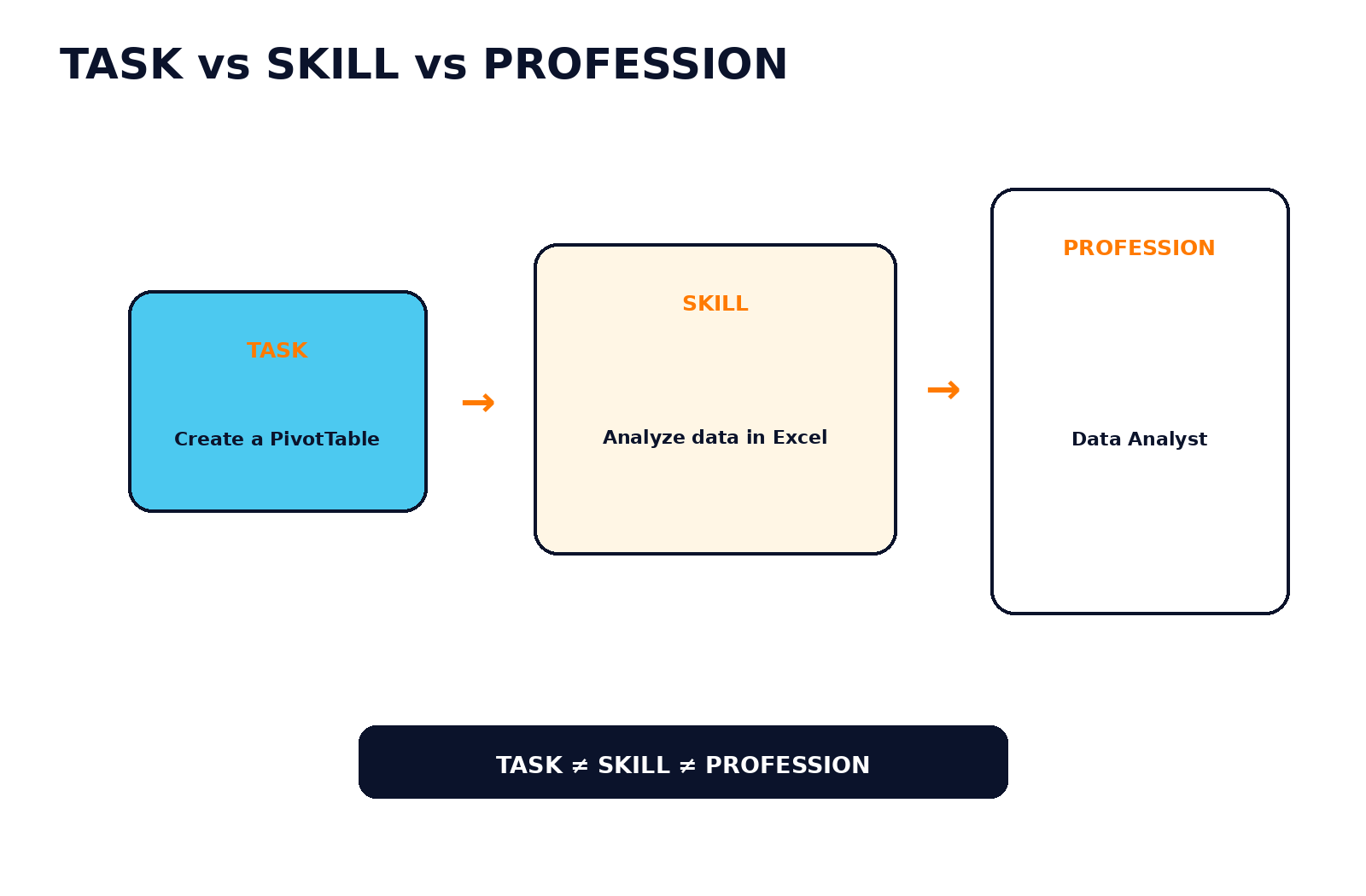 One completed task can be a doorway to a skill, but it is not the same as a profession.
Task-first learning becomes powerful when individual tasks begin connecting into a mental model. Create one PivotTable. Then use different datasets. Learn grouping, calculated fields and data structure. Build dashboards. Eventually, you are developing broader Excel and data-analysis capability.
The same applies to design. Remove one image background. Create a social-media graphic. Learn hierarchy, spacing and typography. Produce several brand assets. Ask for critique. The learner is no longer reproducing one procedure; they are making increasingly independent decisions.
One task can be the doorway to a larger skill.
The important transition is from “Which button do I click?” to “Which approach fits this problem, and why?” That is why a library of completed tutorials is less valuable than a smaller set of tasks you can reproduce, explain, modify and troubleshoot.
Task-first learning is sometimes misunderstood as an argument against theory. It is not. Theory helps you predict what will happen outside the exact example you copied. The practical advantage of a how-to guide is that it can give theory a concrete place to attach.
Imagine learning formulas in a spreadsheet. A guide may first help you use XLOOKUP to return a price from a product table. Once the formula works, you can ask why the lookup value must match, what the lookup array represents, what happens when no match exists and when another approach would be more appropriate. The working example makes the concepts less abstract.
The sequence can therefore move in both directions: concept → example → practice when foundations matter first, or task → observation → explanation → concept when a bounded task provides a useful entry point. Good learning is not loyal to one sequence; it uses the sequence that fits the learner and the consequence of error.
This is also why task-first learning works better when you pause to predict outcomes. Before clicking “Apply,” ask what you expect to change. Before running a formula, predict the result. Before changing a setting, state what behavior should be different. Prediction turns a passive sequence into a small test of understanding.
A strong guide reduces uncertainty without hiding important complexity. Before the first instruction, it should make the outcome and starting assumptions clear. During the procedure, it should separate actions from explanations so that a learner can move quickly without losing context. At consequential steps, it should surface warnings before—not after—the action.
Look for five layers:
Many weak tutorials contain only Layer 3. That is why they can feel clear while everything goes right and become useless the moment your screen differs. The best guides teach you enough about the state of the system to recognize when you should stop.
A polished design, confident presenter or high view count can make a guide easier to consume, but those signals do not prove accuracy. For changing software, compare important instructions with current official documentation. For regulated procedures, use the responsible authority. For technical commands, understand what the command changes before running it in an important environment.
The five minutes after a successful tutorial can determine whether the result becomes disposable or reusable knowledge. Do not immediately close every tab and move on. First, write the task in your own words. Then note the two or three decisions that mattered most and one checkpoint that proved the task worked.
Next, remove the tutorial and attempt a short reconstruction from memory. You do not need to reproduce every detail. Try to remember the structure: where you started, the critical action, the quality check and the final state. If you cannot remember the sequence, reopen the guide, correct your mental model and try again later.
Finally, save only what will help next time. A personal note that says “For this client account, analytics property is X; create event under Y; verify in Z” may be more useful than bookmarking a thirty-minute video. Be careful not to save passwords, private customer data or confidential material in an insecure notes system.
If the task is relevant to your work, create a small variation. A marketer who just learned one UTM structure can build another campaign example. A designer who followed one export workflow can test a different asset size. A developer who copied one API example can change the input and inspect the response. Variation is where the learner begins making decisions rather than merely replaying instructions.
You have probably outgrown a beginner tutorial when you can perform the task without watching every step, explain the important decisions, recognize common failure states and adapt the process to a slightly different input. At that point, repeatedly consuming beginner guides may produce less value than documentation, practice projects, feedback or a more advanced course.
Another signal is that your questions change. Beginners often ask, “Where is the button?” Growing practitioners ask, “Which option should I choose for this situation?” More advanced practitioners ask, “What trade-off am I making, and how can I verify the result?” The questions move from navigation to judgment.
That shift is important for work. Clients and employers rarely need someone who can reproduce one tutorial under perfect conditions. They need someone who can recognize the problem, choose an appropriate method, handle normal variation and explain the result. That is why practical learning should eventually produce evidence and independent decisions, not only completed lessons.
A how-to guide is a focused sequence of instructions designed to help someone complete a defined task or achieve a defined result.
Yes for many bounded practical tasks, especially when the guide matches your tool and context and you repeat the task. Broader skills still need deeper practice and understanding.
Define the exact outcome, find a reliable guide that matches your environment, follow one step at a time, verify checkpoints, then repeat the task with less assistance.
Neither is universally better. Tutorials are efficient for narrow tasks; courses are better when you need connected foundations, structured practice and broader capability.
Tutorials can contribute to a skill, but skill develops through repeated and varied practice, feedback, explanation, adaptation and independent performance.
Following instructions can reduce the need to retrieve or make decisions yourself. Repeating from memory and explaining why the steps work improves independence.
Follow once, repeat with fewer references, try from memory, change an input, explain the process and troubleshoot a variation.
Video is often better for visual movement and interfaces; text is easier to scan, search and reference. A hybrid can work well.
Yes. ChatGPT can provide interactive step-by-step guidance and Study Mode can guide understanding, but changing interfaces and consequential actions should still be verified with authoritative sources.
Check source authority, version match, prerequisites, warnings, expected results, recency and whether important claims agree with official documentation.
Consider deeper structured learning when related tasks keep exposing the same foundational gaps or when you need independent judgment rather than one procedure.
Repeat it, vary the inputs, explain why it works, solve errors, use it in a new context and produce work you can defend without the original guide.
A how-to guide is not a shortcut around learning. It is a way to focus learning on the exact problem in front of you.
If the task is bounded, low-risk and easy to verify, a focused guide may get you to useful action faster than studying an entire subject first. But the guide should become a launchpad, not a permanent crutch. Repeat the process, change the conditions, explain what happened and notice when isolated tasks begin forming a larger skill.
START WITH THE TASK → FOLLOW THE PROCESS → CHECK THE RESULT → REPEAT IT → UNDERSTAND IT → DECIDE WHETHER YOU NEED THE WIDER SKILL
VEZILL's Quick Knowledge direction begins with a simple question: What are you trying to do? Once that is clear, the amount and type of knowledge you actually need becomes much easier to judge.
When you want that knowledge already packaged into a practical resource, start at VEZILL or browse the digital-product library. The idea is simple: access practical knowledge, learn what matters, apply it, and keep moving.
Discover more articles you might be interested in

how to sell digital products without a large social media following
By Davie

A practical expertise-to-product workflow for extracting what you genuinely know, connecting it to a real problem, packaging it into a useful digital product, validating demand and using AI without inventing proof.
By Davie

how to turn your experience into a digital product
By Davie

Turn What You Know Into Practical Knowledge
By Davie
Get the updates, on newly released, popular & fast-moving MRR digital products
Up to Top
Comments All
Jimmy
@jimmy
Sometimes you just need a clear step-by-step guide instead of going through tons of information. A good how-to can save so much time when you’re trying to learn something specific. This was a good reminder to keep learning simple and practical.
September 17,2026 At 05:45 PM