
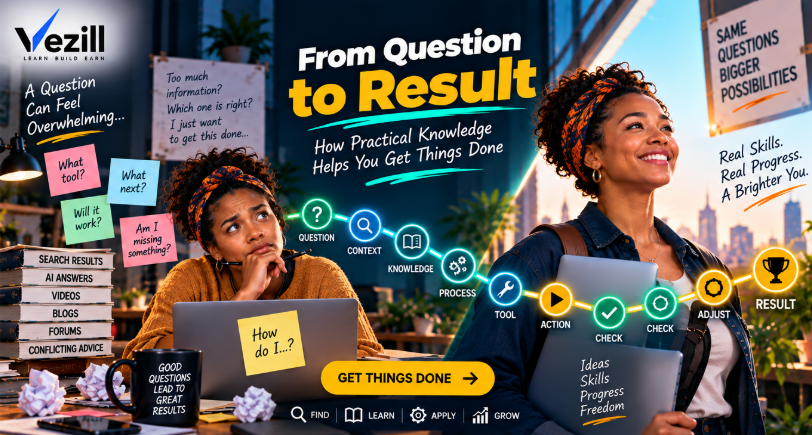
An answer can tell you what to do. Practical knowledge helps bridge the gap between understanding the answer and producing a result you can verify.
You search: “How do I create an invoice?” Within seconds, Google, YouTube or an AI assistant can tell you that an invoice normally contains business details, customer details, an invoice number, date, items or services, prices, total and payment information. Technically, your question has been answered.
But your cursor is still blinking on a blank page. What should yours actually look like? What goes in each field? How should you number invoices? Should you use Word, Excel or invoicing software? Which payment details belong there? How do you check the totals? What does a finished invoice look like? How do you know you have not forgotten something?
THE ANSWER GAP The internet can answer your question in seconds. Getting the result may still take much more than an answer.
That missing middle is where practical knowledge becomes useful. It can add context, sequence, examples, tools, checkpoints and troubleshooting that turn an explanation into something you can use. The goal is not to consume more knowledge. The goal is to have enough reliable knowledge to take the right next action.
QUICK ANSWER Practical knowledge helps you get things done by turning information into something usable in a real situation. Instead of stopping at an explanation, it can provide the context, sequence, tools, examples, checkpoints and troubleshooting needed to move from a question to action and from action to a verified result.
The amount of knowledge required depends on the task. A simple factual question may need only an answer. A bounded task may need a guide or tool. A recurring capability may require structured learning and practice. High-consequence professional work may require qualifications, supervision or expert help.
CORE PRINCIPLE THE SIZE OF THE KNOWLEDGE SHOULD MATCH THE SIZE OF THE TASK.
Finding an answer and producing a result are different stages of problem solving. If you ask “What does CTR mean?”, the definition may finish the job. If you ask “Why is my campaign CTR falling?”, a definition is only the beginning. You may need campaign context, historical data, creative comparisons, audience information, a diagnostic sequence and a way to test competing explanations.
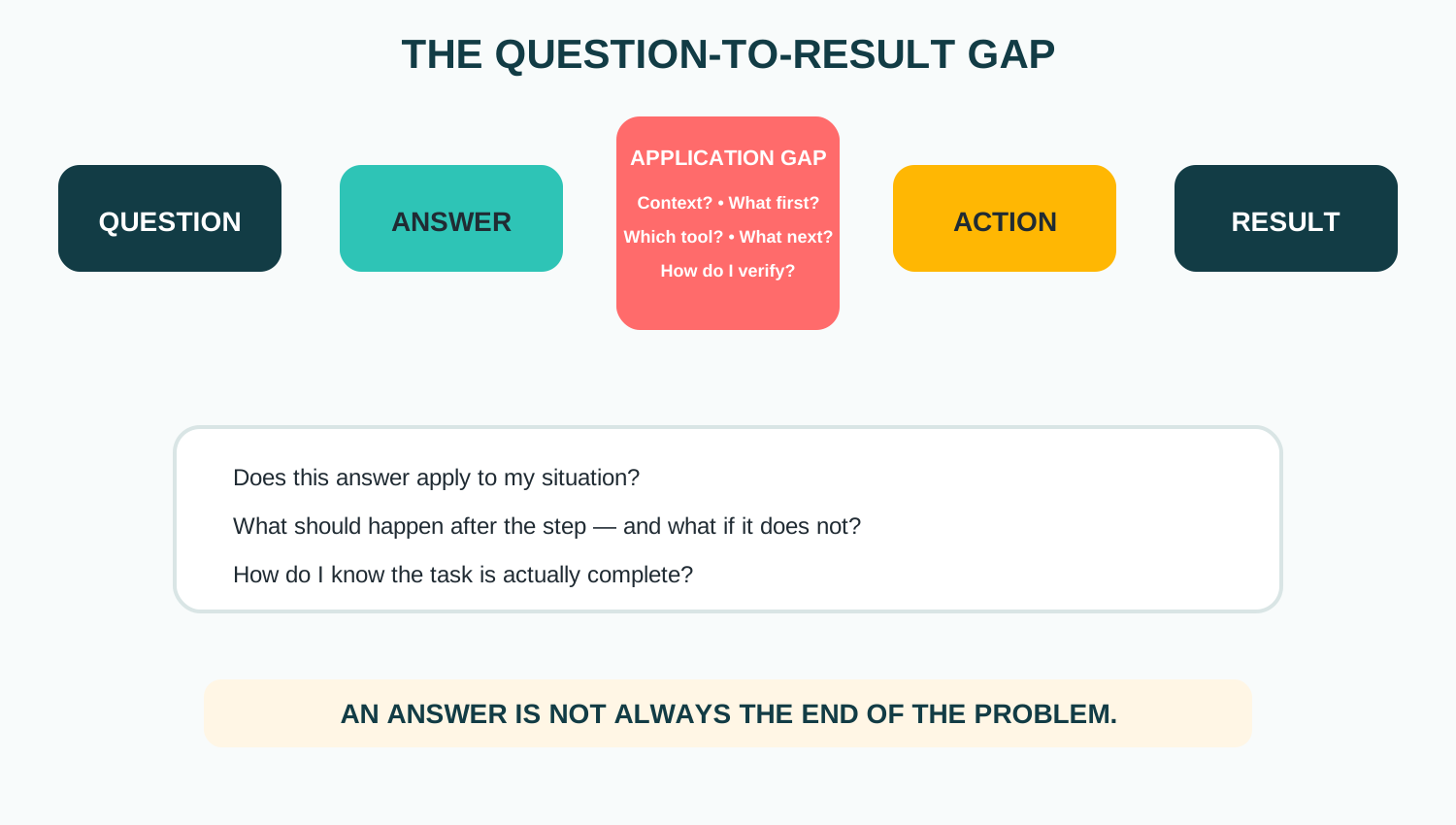 The application gap contains the questions that determine whether an answer can actually be used in your situation.
This is why practical knowledge should not be defined by length. A two-line instruction may be perfectly practical when the task is simple. A 30-page guide may still be impractical if it never tells the reader what to do first, what to expect or how to check the result.
Consider one goal: calculate business profit. An answer gives the formula: Profit = Revenue − Expenses. An instruction says to subtract expenses from revenue. A guide explains which figures to gather and how to calculate. A spreadsheet can perform the calculation. Practical knowledge combines whichever of these pieces the user actually needs to calculate correctly, interpret the result and recognize limitations.
DISTINCTION Practical knowledge is not one file format. It is the usable knowledge required for the outcome.
The following is an original VEZILL explanatory framework, not a scientifically validated universal model. Its job is to make the missing middle visible.
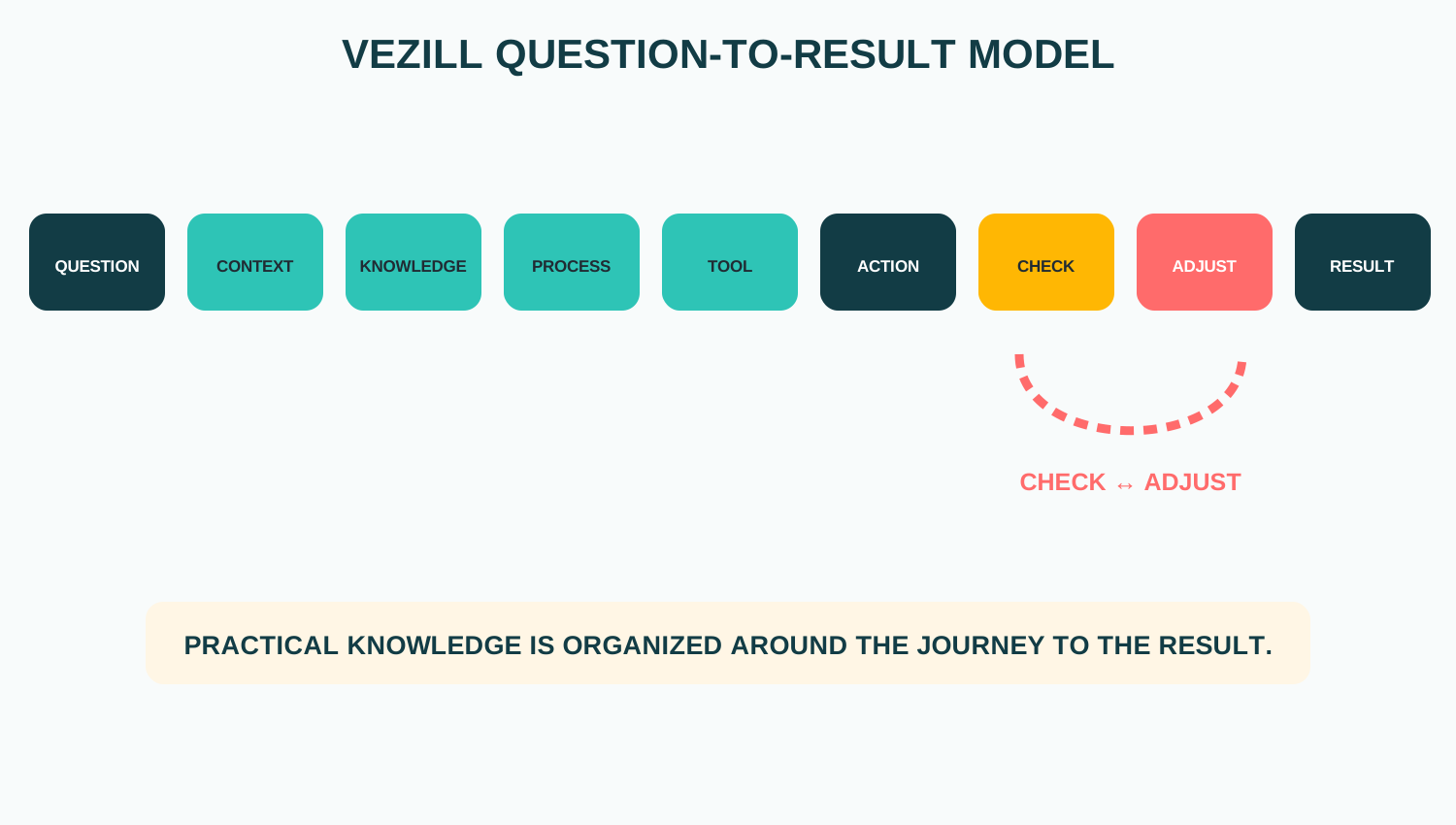 QUESTION → CONTEXT → KNOWLEDGE → PROCESS → TOOL → ACTION → CHECK → ADJUST → RESULT.
1. QUESTION What am I trying to accomplish? 2. CONTEXT What is my starting situation? 3. KNOWLEDGE What do I need to know? 4. PROCESS In what order should I act? 5. TOOL What helps me perform the task? 6. ACTION Do the thing. 7. CHECK Did the expected result happen? 8. ADJUST What changes if it did not? 9. RESULT Confirm the desired outcome.
The first two stages explain why useful searching starts before the search box. VEZILL’s What Are You Trying to Do? How to Find Practical Knowledge Online begins with defining the outcome and narrowing the gap. A better question gives the rest of the process a better starting point.
Suppose you ask, “How do I connect my domain?” The correct procedure can depend on the registrar, DNS provider, hosting platform, current nameservers, existing email records, account permissions and the records your website platform requires. Two people can ask the same sentence and need different instructions.
CONTEXT SAME QUESTION + DIFFERENT CONTEXT = POTENTIALLY DIFFERENT ACTION
Generic instructions can therefore be technically correct while still failing in your situation. Good practical knowledge states the conditions under which the procedure applies, including tool, version, starting point and relevant constraints.
Learning research distinguishes declarative knowledge—facts and concepts—from procedural knowledge concerned with how procedures are performed. The distinction is not perfectly clean in real work, but it helps explain why someone can describe what a PivotTable does and still struggle to build the correct PivotTable from a messy dataset.
Cognitive-load research adds another caution: working memory is limited, and novices can struggle when too many interacting elements must be processed at once. Good instructional design can reduce avoidable load, but simply making content shorter is not a universal solution. Prior knowledge and task complexity matter.
KEY DISTINCTION KNOWING WHAT SHOULD HAPPEN IS NOT ALWAYS THE SAME AS BEING ABLE TO MAKE IT HAPPEN.
VEZILL can represent the movement from information toward a result with another explanatory framework. Higher is not automatically better; the useful level depends on the problem.
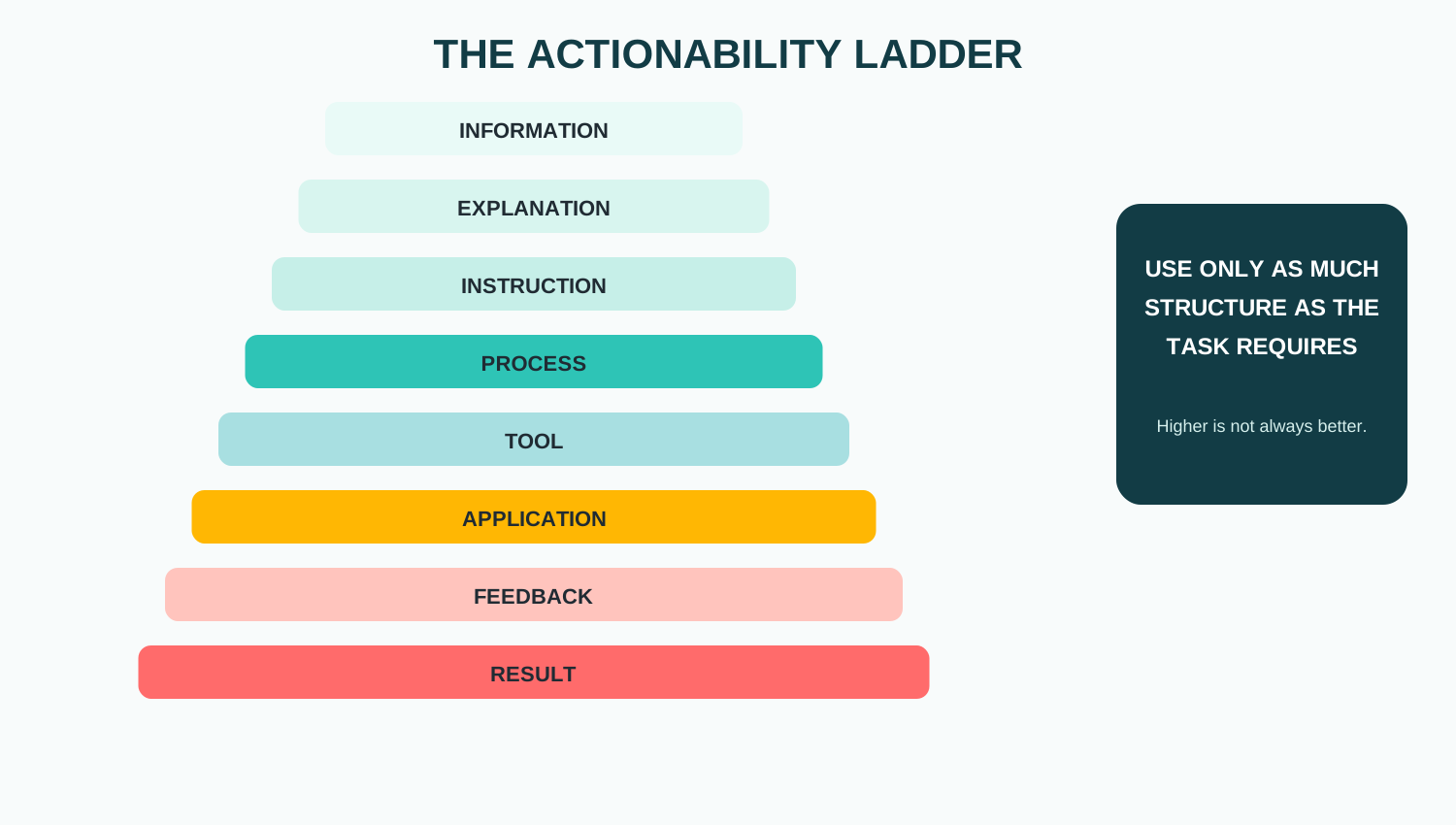 Information can be enough for a definition; diagnosis or execution may require a process, tool, application and feedback.
If the question is “What does CTR mean?”, information may be enough. If the question is “Why is my CTR falling?”, useful knowledge may include diagnosis, context, comparison, testing and feedback.
Connecting a domain might require confirming ownership, identifying the DNS provider, obtaining the correct records, preserving the existing configuration, making the change, waiting for propagation, verifying the website and checking that email still works. Randomly knowing all eight facts is not equivalent to knowing the process.
SEQUENCE PRACTICAL KNOWLEDGE DOES NOT ONLY TELL YOU WHAT MATTERS. IT HELPS PUT WHAT MATTERS IN THE RIGHT ORDER.
That is why VEZILL’s step-by-step guide article emphasizes matching the task, tool, version and starting point, then checking expected results during the process.
Suppose a beginner learns Profit = Revenue − Expenses. A worked example makes the procedure concrete: Revenue = KES 120,000; Expenses = KES 75,000; therefore Profit = KES 45,000. The learner can then apply the same structure to their own figures.
Recent research reviews describe worked examples as step-by-step demonstrations that can support novice learning, especially when they are well designed and followed by opportunities to solve related problems. The evidence also cautions against assuming every example works equally well: task structure, prior knowledge and design matter.
Practical knowledge does not have to live in paragraphs. A spreadsheet can encode calculations. A checklist can encode sequence. A decision tree can encode conditional choices. A template can encode structure. An SOP can encode a repeatable process. A scorecard can encode evaluation criteria.
DESIGN PRINCIPLE SOMETIMES THE BEST WAY TO PACKAGE KNOWLEDGE IS NOT TO EXPLAIN MORE — IT IS TO BUILD THE KNOWLEDGE INTO THE TOOL.
Instead of teaching a shop owner to redo fifteen calculations every month, a spreadsheet may encode the formulas while a short guide explains which inputs belong in each field, what the outputs mean and how to verify them. The tool reduces repeated effort; the surrounding knowledge prevents blind use.
A strong process tells the user what they should expect after important actions. That creates a checkpoint: ACTION → EXPECTED RESULT → CHECK. For a DNS change, the action might be adding a record. The expected result is that the record appears correctly. The check confirms the saved value before the user continues.
CHECKPOINT A PROCESS WITHOUT CHECKPOINTS CAN LET SMALL ERRORS TRAVEL ALL THE WAY TO THE END.
Most tutorials show the happy path: Step 1 → Step 2 → Step 3 → Success. Reality can be Step 1 → unexpected result → diagnose → adjust → continue. Depending on the task, strong guidance may document common symptoms, likely causes, recovery actions, rollback steps and when to escalate.
REAL-WORLD GUIDANCE A GOOD GUIDE SHOWS YOU THE ROAD. A GREAT PRACTICAL RESOURCE ALSO HELPS WHEN YOU LEAVE THE ROAD.
Action creates feedback that reading alone cannot provide. You learn a method, apply it, compare what happened with what should have happened, adjust and try again. A result becomes experience; repeated experience can contribute to better judgment.
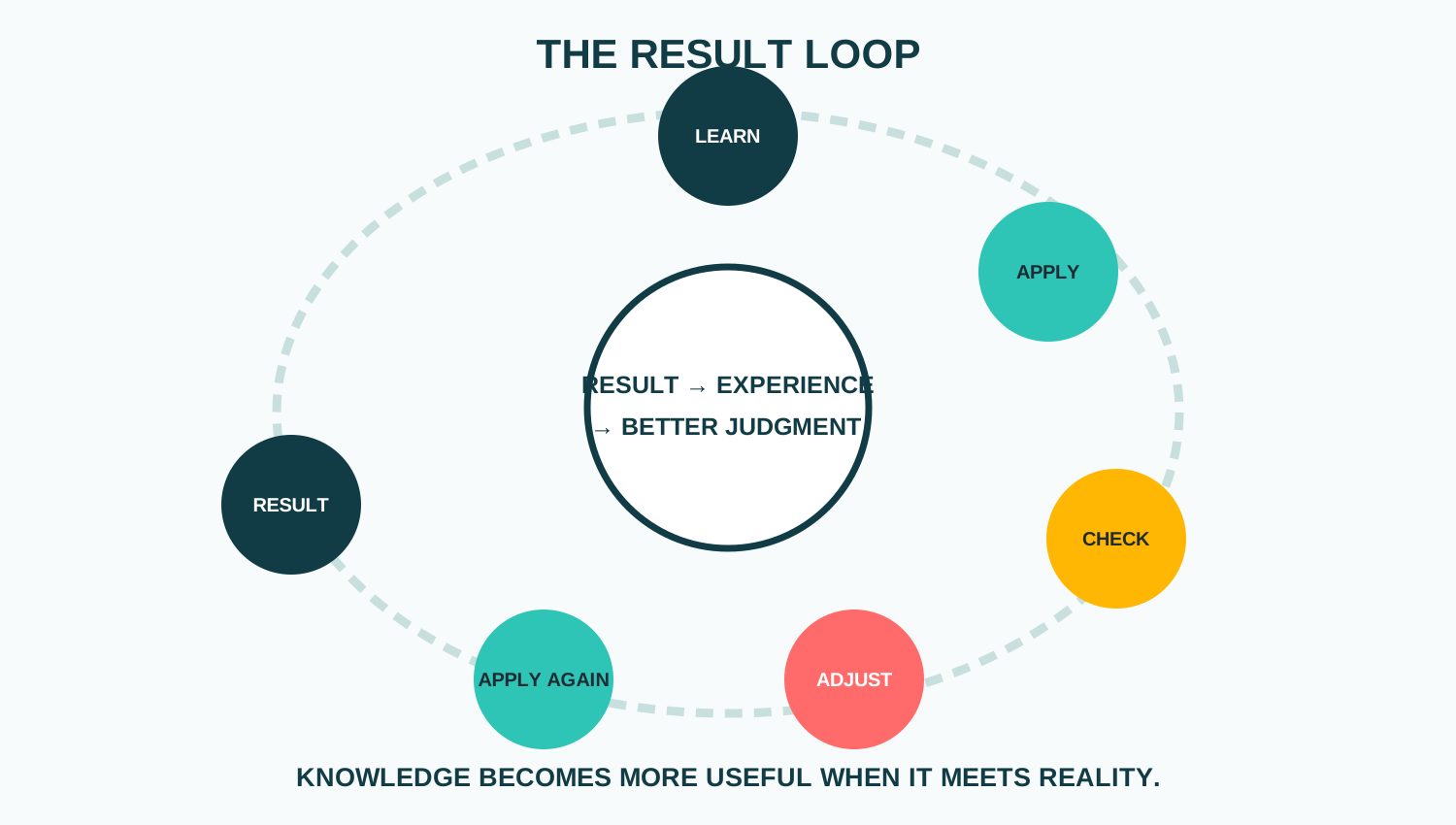 LEARN → APPLY → CHECK → ADJUST → APPLY AGAIN → RESULT; then RESULT → EXPERIENCE → BETTER JUDGMENT.
For this article, VEZILL’s core ACCESS → LEARN → APPLY idea can be expanded as ACCESS → LEARN → APPLY → CHECK → IMPROVE. The expansion is a learning loop, not a replacement for the core positioning.
VEZILL’s Quick Knowledge vs Online Courses makes this boundary clear. An AI-generated spreadsheet formula can work even when the user has not learned Excel. Task completion means the immediate result works. Learning means you understand why. Skill means you can do it again. Competence means you can adapt when conditions change.
BOUNDARY GETTING ONE RESULT IS NOT THE SAME AS MASTERING THE SKILL THAT PRODUCED IT.
AI can shorten the distance between a question and a useful next step. Conversational search can return timely answers with links to web sources, while interactive assistants can work through follow-up questions and user-provided context. Screenshots, documents and other inputs can make some troubleshooting conversations more concrete.
But an AI response does not guarantee a real-world result. Missing context, hallucinations, outdated information, version differences, wrong assumptions, user execution errors and changing conditions still matter. The consequence of error should determine how much verification is required.
AI PRINCIPLE AI CAN REDUCE THE DISTANCE BETWEEN QUESTION AND ACTION. IT CANNOT GUARANTEE THE RESULT.
I am trying to accomplish [outcome].
I am using [tool/version].
My current state is [context].
Ask for any missing information that materially changes the instructions.
Then guide me one step at a time.
After each important step, tell me what I should expect to see and how to verify it.
If the result differs, help me diagnose before moving on.
This does not make AI infallible. It improves the context available to the assistant and builds verification into the interaction.
Before calling a practical resource “ready to use,” VEZILL can ask nine questions. This is an original editorial and product-design framework, not a scientifically validated assessment.
1. Outcome Is the desired result clear? 2. Context Who or what situation does it apply to? 3. Prerequisites What must already be available? 4. Sequence Are the actions ordered? 5. Example Can the user see correct execution? 6. Tool Could a tool reduce unnecessary work? 7. Checkpoint Can the user verify progress? 8. Troubleshooting What if the expected result does not occur? 9. Final Verification How does the user know the task is complete?
This visible process is also represented in the page’s HowTo structured data.
The examples below show why the useful knowledge unit depends on the task. They do not imply that every task can always be solved with a short guide.
| Question / Task | Information Answer | Practical Knowledge Needed | Useful Format | Result |
|---|---|---|---|---|
| Calculate profit | Revenue − expenses | Which figures count; example; check | Spreadsheet + guide | Profit calculated |
| Track shared expenses | Use rows and totals | Structure, formulas, permissions | Template | Tracker working |
| Export Canva for print | Use print export | Dimensions, bleed, printer requirements | Checklist | Print-ready file |
| Connect a WordPress domain | Update DNS | Provider records, sequence, checks | Task guide | Domain resolves |
| Summarize a report with AI | Ask AI to summarize | Scope, sources, verification | Prompt workflow | Checked summary |
| Run a code project | Install dependencies | Environment, versions, commands, errors | Setup guide | Project runs |
| Scale a recipe | Multiply quantities | Ratios, pan size, timing caveats | Calculator + guide | Recipe scaled |
| Prepare for interview | Practise answers | Role analysis, evidence, rehearsal | Framework | Prepared examples |
| Tailor a CV | Match role keywords | Evidence selection, truthful wording | Checklist + template | Role-specific CV |
| Scope freelance work | Define deliverables | Questions, exclusions, revisions | Questionnaire | Clear scope |
| Plan a campaign | Define audience and offer | Assets, sequence, metrics | Campaign brief | Launch-ready plan |
| Create ecommerce listing | Add title, photos, description | Platform rules, images, offer | Checklist | Listing published |
| Plan social posts | Choose topics and dates | Pillars, formats, workflow | Calendar | Week planned |
| Create invoice | Add seller, buyer, items, totals | Numbering, fields, payment, checks | Template + guide | Invoice sent |
| Reconcile cash record | Compare transactions | Categories, mismatches, evidence | Spreadsheet | Records reconciled |
| Make monthly budget | Plan income and spending | Categories, priorities, review | Budget template | Monthly plan |
| Prepare photo shoot | Plan equipment and shots | Client needs, backups, timing | Checklist | Shoot prepared |
| Remove duplicates | Use duplicate tool | Key columns, backup, validation | Task guide | Dataset cleaned |
| Add web analytics | Install tracking | Property, placement, testing | Setup guide | Tracking verified |
| Create welcome email | Write and automate | Trigger, audience, content, test | Template + checklist | Flow tested |
| Run weekly review | Review tasks/calendar | Capture, prioritize, plan | Checklist | Week organized |
| Assess dripping tap | Identify likely source | Fixture, isolation, escalation | Decision guide | Next safe action |
| Move phone photos | Use transfer/cloud | Device, storage, backup, check | Task guide | Photos copied |
| Track poultry records | Record inputs/outputs | Fields, frequency, interpretation | Spreadsheet | Records maintained |
| Handle refund request | Follow policy | Eligibility, evidence, escalation | Response framework | Case handled |
| Screen applicants | Compare criteria | Evidence and scoring | Scorecard | Shortlist documented |
| Hand off design files | Package assets | Formats, naming, usage notes | Checklist | Handoff complete |
| Create client update | Summarize progress | Audience, metrics, risks | Template | Deck ready |
| Count closing stock | Count quantities | Categories, discrepancies, sign-off | SOP + sheet | Stock recorded |
| Close a project | Confirm completion | Handover, outstanding items, archive | Checklist | Project closed |
| Organize M-PESA sales | Record transactions | Categories, reconciliation context | Spreadsheet + guide | Sales organized |
| Publish blog post | Add content | Formatting, links, images, metadata | Publishing checklist | Post live |
| Build KPI report | Track metrics | Definitions, sources, commentary | Dashboard | Report ready |
| Export social video | Choose settings | Aspect ratio, captions, quality | Checklist | Video ready |
| Compare supplier quotes | Compare price/terms | Like-for-like criteria and risk | Comparison sheet | Options evaluated |
| Confirm event suppliers | Track status | Contacts, deadlines, deposits | Tracker | Status visible |
| Run discovery call | Ask questions | Outcome, constraints, decision process | Framework | Discovery captured |
| Revise one concept | Review and practise | Explanation, example, retrieval, feedback | Mini-guide + quiz | Concept tested |
| Verify online claim | Check sources | Original source, date, context | Checklist | Claim assessed |
| Hand over recurring task | Document process | Inputs, exceptions, access, checks | SOP | Task transferable |
Not every question needs a guide. An answer may be enough when the question is factual, the task is simple, consequences are low, you already understand the context and the result is easy to verify. “What does CTR stand for?”, “What is 10% of 5,000?” and “What shortcut copies text?” can often end at the answer.
BOUNDARY NOT EVERY QUESTION NEEDS A GUIDE.
Focused practical knowledge often fits when the outcome is bounded, prerequisites are known, steps are understandable, risk is manageable, errors are reversible and the result can be checked. Creating a basic invoice, resizing an image, building a simple household budget or using a PivotTable for one report can fit—depending on the person and context.
Repeated task searches can reveal a larger skill gap. If you repeatedly search spreadsheet formulas, data cleaning, charts and analysis methods, the real need may be a structured Excel or data-analysis foundation.
DEPTH RULE ONE TASK → PRACTICAL KNOWLEDGE
REPEATED TASK → BUILD THE SKILL
PROFESSIONAL RESPONSIBILITY → DEEPER TRAINING + EXPERIENCE
Medicine, law, advanced accounting, electrical systems, structural engineering, advanced cybersecurity, complex investing, professional software architecture, aviation and other safety-critical work should not be reduced to “follow this quick guide.” A practical resource can support learning without replacing qualifications, supervision, standards or professional judgment.
VEZILL’s How to Identify Valuable Knowledge You Already Have suggests examining problems you repeatedly solve, questions people ask, mistakes you have learned to avoid and processes you have improved. Packaging then means extracting the outcome, prerequisites, sequence, examples, tools, checkpoints, exceptions and maintenance needs so someone else can use that knowledge responsibly.
VEZILL’s About page describes a digital knowledge marketplace connecting people who know how with people who need to know how, while the VEZILL FAQ defines Quick Knowledge as focused practical information designed around a task, problem or outcome.
VEZILL POSITIONING KNOWLEDGE IS THE VALUE.
DIGITAL PRODUCTS ARE THE CONTAINER.
THE MARKETPLACE IS THE DELIVERY MECHANISM.
A guide, template, checklist, spreadsheet, calculator, SOP, prompt, framework, toolkit or mini-course can all be containers. The VEZILL homepage and VEZILL products page provide the discovery layer; the real test is whether the knowledge helps the right person make reliable progress toward a real outcome.
Knowledge organized so it can be used in a real situation, potentially combining information, context, sequence, examples, tools, checkpoints and judgment.
It reduces the gap between understanding an answer and performing the task by showing what applies, what to do, what to expect and how to verify the result.
Information provides facts or explanations; practical knowledge organizes the relevant information around use in a particular task or context.
A profit spreadsheet plus a guide explaining which numbers to enter, a worked example and how to check the result is one example.
Real performance can require procedural knowledge, sequence, context, tool use, practice and feedback beyond recognizing or recalling a fact.
Define the outcome and context, find reliable knowledge, organize the process, act, check the expected result, adjust when necessary and verify completion.
It broadly means developing understanding or capability through performing tasks and learning from consequences, feedback and reflection.
They can be when they match the context, order actions, explain important details, include checkpoints and help with common problems.
Yes. Their structure, formulas, fields and decision rules can encode part of a process, although users still need enough context to use them correctly.
AI can help explain, organize and personalize guidance, but outputs still need verification appropriate to the consequence of error.
Usually when the question is factual or the task is simple, low-risk, well-contextualized and easy to verify.
Deeper structured learning is useful when concepts depend on one another, you need the capability repeatedly, practice matters or professional competence is the goal.
Search and AI are making answers faster and easier to retrieve. But a real task often asks more: Does this apply to me? What do I do first? What should I see next? What if it fails? How do I know I am finished?
Practical knowledge is valuable because it can organize those missing pieces around action. Sometimes that requires one instruction. Sometimes it requires a process, worked example, template and checkpoint. Sometimes the task is large enough that a course, repeated practice or professional training is the responsible choice.
FINAL PRINCIPLE KNOWLEDGE BECOMES PRACTICAL WHEN IT HELPS YOU MOVE FROM “WHAT DO I DO?” TO “IT’S DONE.”
The aim is not to learn less for its own sake. It is to match the knowledge to the task, verify what matters and apply it. QUESTION → KNOWLEDGE → ACTION → CHECK → RESULT. Browse VEZILL products or return to the VEZILL practical knowledge hub.
Discover more articles you might be interested in
how to create your first knowledge product in one weekend
By Davie

how to build multiple digital products from one skill
By Davie

how to find problems people will pay you to solve
By Davie

How to turn a hobby into a digital product
By Davie
Get the updates, on newly released, popular & fast-moving MRR digital products
Up to Top
Comments All
Tony
@tony
You don’t need more information—you just need the right information that helps you take action. Turning a question into an actual result is what makes practical knowledge so useful.
September 17,2026 At 06:02 PM