
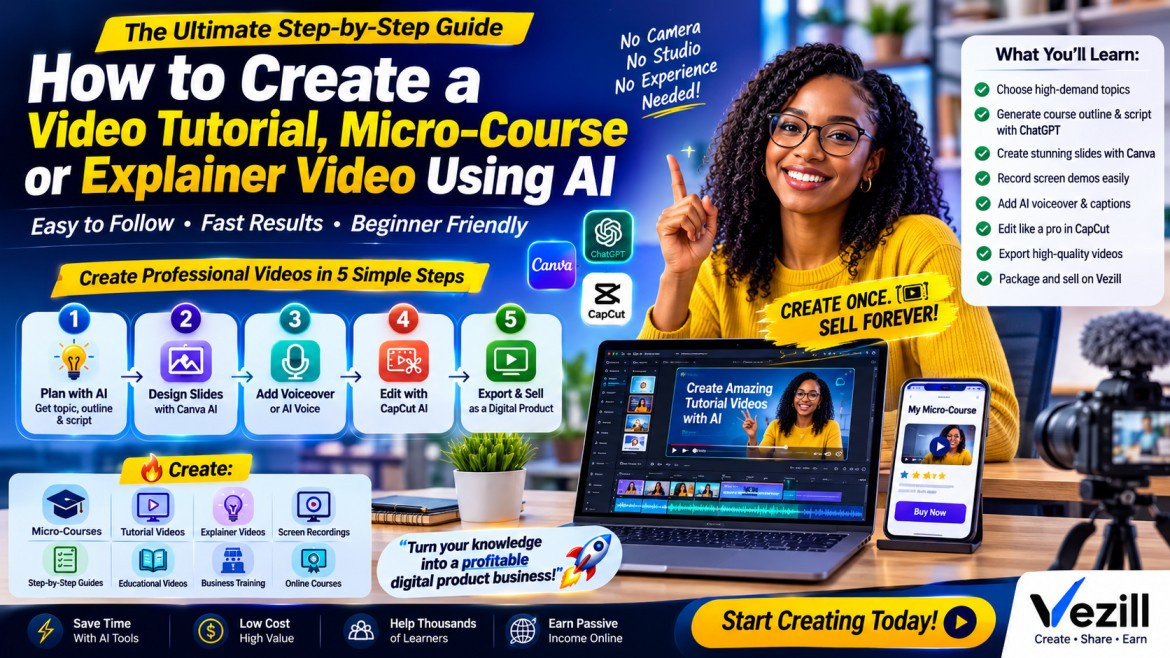
You no longer need an expensive camera, professional studio, editing team or weeks of production to create a useful video course.
Using AI, you can turn a skill, idea or solution into a professional-looking:
Video tutorial
Micro-course
Explainer video
Screen-recording lesson
How-to training
Mini masterclass
Educational video
Business training video
A simple workflow is:
IDEA → OUTLINE → SCRIPT → VISUALS → VOICE → VIDEO → EDIT → EXPORT → SELL
For beginners, one of the easiest combinations is:
ChatGPT + Canva + CapCut
You can also use tools such as Descript when you want more automated video production and text-based editing. Descript currently offers an AI Video Maker capable of generating a script, voiceover and visuals from an idea or existing script.
For your first project, do not try to create a 10-hour course.
Create something that solves one specific problem.
For example:
Instead of:
Digital Marketing Course
Create:
How to Create a 30-Day Social Media Content Plan With ChatGPT
Instead of:
Excel Course
Create:
10 Excel Formulas Every Small Business Owner Should Know
Instead of:
Canva Training
Create:
How to Design a Professional Business Poster in Canva in 30 Minutes
A focused micro-course is easier to create, easier for customers to understand and easier to market.
Start by answering this question:
Look for a practical outcome.
Good examples include:
Create a CV with ChatGPT
Design a poster with Canva
Create an ebook with AI
Build a simple Excel dashboard
Create a faceless video
Use ChatGPT for research
Automate emails
Create social media content
Create an online course
Use AI for studying
Optimize a LinkedIn profile
Create a Facebook advertisement
Edit videos with CapCut
Your course should ideally complete this sentence:
After watching this course, you will be able to ________.
Example:
After watching this course, you will be able to create and edit your first professional faceless AI video.
That becomes your course promise.
Avoid creating a course for “everyone.”
Choose a specific learner.
Examples:
ChatGPT for Teachers
Canva for Small Business Owners
Excel for Administrative Assistants
AI for University Students
CapCut for Content Creators
ChatGPT for Job Seekers
This helps AI generate better lessons and also makes your product easier to market.
Write down:
Target audience: Small business owners
Problem: They struggle to consistently create social media posts.
Outcome: Create 30 social posts quickly using AI.
Your course could therefore become:
You do not need to manually plan every lesson.
Give ChatGPT your topic, learner and desired result.
Use this prompt:
Act as an instructional designer and expert trainer.
I want to create a beginner-friendly micro-course about:
[COURSE TOPIC]
Target audience:
[TARGET AUDIENCE]
Main outcome:
By the end of the course, the learner should be able to:
[DESIRED OUTCOME]
Create a practical micro-course that can be completed in approximately 45–60 minutes.
Structure it into 5–7 short lessons.
For each lesson provide:
1. Lesson title
2. Learning objective
3. What should be explained
4. Practical demonstration
5. Example
6. Action the learner should complete
Keep the course highly practical, easy to understand and focused on getting the learner a fast result.
Avoid unnecessary theory.
You now have your curriculum.
Suppose the topic is:
AI might produce:
Choosing a profitable ebook topic
Creating the ebook outline with ChatGPT
Writing the chapters
Editing and improving the content
Designing the ebook in Canva
Exporting the final PDF
Packaging and selling the ebook
That is already enough to begin production.
Next, generate a script for each lesson.
Do one lesson at a time rather than asking AI to write the entire course at once.
Use:
Write the complete teaching script for Lesson 1 of my micro-course.
Course:
[COURSE TITLE]
Lesson:
[LESSON TITLE]
Target learner:
[TARGET AUDIENCE]
Lesson objective:
[OBJECTIVE]
The lesson should take approximately 5–8 minutes.
Write it in simple conversational language.
Structure it as:
1. Quick introduction
2. Why this matters
3. Step-by-step explanation
4. Practical example
5. Demonstration instructions
6. Common mistakes
7. Quick recap
8. Action step for the learner
Write naturally for spoken video narration rather than as an article.
Repeat for each lesson.
OpenAI's own Academy has demonstrated using ChatGPT to create structured video scripts for formats including YouTube and short-form video, making this a practical use of the tool.
Before making the video, determine what the viewer will see while each part of the script is being narrated.
Use this prompt:
Turn the following video lesson script into a storyboard.
Create a table containing:
Scene number
Narration
What appears on screen
Recommended visual
Screen recording required?
Text displayed on screen
Approximate duration
Keep scenes between approximately 5 and 20 seconds where practical.
Use a mix of:
- screen recordings
- slides
- headings
- icons
- screenshots
- illustrations
- diagrams
- demonstrations
SCRIPT:
[PASTE SCRIPT]
Now you have your production plan.
This step prevents you from wondering:
“What should be showing on the screen while the voice is speaking?”
Open Canva.
Create a Presentation 16:9 project.
You can manually build the slides or use Canva's AI presentation tools to generate an editable starting deck from a prompt. Canva currently offers AI-powered presentation generation and a video editor for arranging clips, transitions and audio.
For example, prompt Canva with:
Create a clean professional educational presentation titled:
How to Create an Ebook With ChatGPT
Audience: beginners and digital entrepreneurs.
Use a clean white background with blue accents.
Create slides for:
1. Introduction
2. Choosing the ebook topic
3. Researching the audience
4. Creating the outline
5. Writing with AI
6. Editing
7. Designing the ebook
8. Exporting the PDF
9. Selling the ebook
10. Key takeaways
Use minimal text, icons, diagrams and clear visual hierarchy.
Then edit the generated slides.
Do not place your full narration on the slide.
The voice explains.
The slide supports.
For example:
Your narration might say:
Before creating your ebook, identify a problem people are actively trying to solve. A strong ebook normally promises a clear result.
The slide only needs:
Problem → Solution → Digital Product
This makes your video look much more professional.
Your course may need:
Illustrations
Diagrams
Icons
Screenshots
Workflow graphics
Before-and-after examples
Product mockups
Infographics
You can create them with Canva's AI tools or another image-generation tool.
Canva AI currently supports generating editable creative layouts and AI-powered visual elements inside its editor.
For an explainer video, visuals might show:
Problem → Process → Solution
For example:
Choose Topic → Ask AI → Create Script → Build Video → Publish
Visual processes dramatically simplify explanations.
For software tutorials, screen recording is often more useful than generated visuals.
If your lesson is:
How to Create a Poster in Canva
show Canva.
If your lesson is:
How to Create a Pivot Table in Excel
show Excel.
If your lesson is:
How to Generate Content With ChatGPT
show the actual prompt and result.
Record the process while performing the task.
Keep each demonstration focused.
Instead of recording 25 minutes continuously, record short segments such as:
Clip 1: Opening ChatGPT
Clip 2: Entering the prompt
Clip 3: Reviewing the result
Clip 4: Improving the answer
Clip 5: Exporting the content
Short clips are easier to edit.
You have three main options.
Best for:
Personal brands
Trainers
Consultants
Teachers
Experts
Read your script naturally while recording.
You do not need a perfect “radio voice.”
Clarity matters more.
If you don't want to record yourself, generate narration from your script.
CapCut currently provides text-to-speech with multiple AI voices, allowing creators to paste text, select a voice and generate narration.
Basic process:
Paste script → Choose voice → Generate audio → Add to video
For certain explainer courses, you can use an AI presenter.
This works well for:
Introductions
Explanations
Corporate training
Language courses
Business education
However, don't use the avatar for every second of a tutorial.
Combine:
Presenter + Slides + Screen Recordings + Examples
That creates a more engaging course.
Import:
Your slides
Screen recordings
Images
Voiceover
Intro
Outro
Demonstration clips
Arrange everything according to your storyboard.
A simple timeline could look like:
Intro
↓
Slide
↓
Screen demonstration
↓
Graphic
↓
Example
↓
Summary
↓
Action step
CapCut currently combines traditional video editing with AI features such as text-to-speech and automated video tools.
Captions are strongly recommended.
They help viewers follow explanations and improve accessibility.
In CapCut, use the automatic caption feature.
CapCut's current auto-caption tool can convert speech into text and generate subtitles automatically.
After generating them:
Review the captions manually.
AI can mishear:
Names
Technical terms
Acronyms
Brand names
Numbers
Correct those mistakes before exporting.
One of the biggest mistakes beginners make is trying to make a course long.
Remove:
Repetition
Long introductions
Empty pauses
Irrelevant explanations
Repeated examples
Unnecessary animations
Ask:
Does this section help the learner achieve the promised result?
If not, remove it.
A useful 35-minute course is better than a boring 2-hour course.
Keep your intro short.
Example:
Welcome to Create Your First Ebook With ChatGPT and Canva.
In this micro-course, I'm going to show you the complete process from choosing your topic to creating your finished PDF.
By the end, you should have the knowledge and workflow needed to create your own ebook.
Let's get started.
Aim for approximately 20–40 seconds.
Do not waste five minutes explaining who you are.
Micro-courses work best when viewers actually do something.
End Lesson 1 with:
Your action now is to identify three problems your target audience wants solved.
End Lesson 2 with:
Use the prompt provided and generate your first course outline.
End Lesson 3 with:
Write and review the script for your first lesson.
This turns passive watching into practical training.
You can dramatically increase the perceived value of your video product with simple supporting materials.
Create:
AI prompt pack
Checklist
Workbook
Cheat sheet
Templates
Resource guide
Action plan
Course notes
For example:
Create Your First Ebook With AI
25 Ebook Prompts
Ebook Creation Checklist
Topic Validation Worksheet
Canva Design Checklist
Publishing Checklist
The customer now receives more than a video.
They receive a complete implementation kit.
A practical standard for most online tutorials is:
Resolution: 1080p
Aspect ratio: 16:9
Format: MP4
For vertical mobile tutorials or short-form previews, you can additionally produce:
9:16 vertical versions
Use the vertical clips to promote the full course.
Use Canva.
Keep it simple.
For example:
ChatGPT + Canva
Use:
Large title
One main image
High contrast
Minimal wording
Clear result
Avoid covering the thumbnail with paragraphs.
Compare:
AI Course
ChatGPT for Beginners
ChatGPT for Beginners: Master 15 Everyday Tasks in 60 Minutes
Another:
Canva Training
Canva for Small Business: Create Professional Social Media Posts in 60 Minutes
Use this formula:
Examples:
AI for Teachers: Create Lesson Plans & Quizzes With ChatGPT
Excel for Business Owners: Master 10 Essential Formulas
CapCut for Beginners: Edit Your First Professional Video
Canva for Entrepreneurs: Create 30 Social Posts Fast
Give ChatGPT your course details.
Use:
Write a high-converting product description for my video micro-course.
Course title:
[TITLE]
Target audience:
[AUDIENCE]
Main problem:
[PROBLEM]
Outcome:
[RESULT]
Duration:
[DURATION]
Lessons:
[PASTE LESSONS]
Bonuses:
[LIST BONUSES]
Write:
1. Strong headline
2. Short opening problem statement
3. What the learner will achieve
4. What is included
5. Who the course is for
6. Key benefits
7. Course curriculum
8. Bonus resources
9. Frequently asked questions
10. Strong call to action
Use clear language and avoid unrealistic income or outcome guarantees.
Your final digital product might contain:
60-minute video micro-course
PDF workbook
Prompt pack
Checklist
Templates
Resource guide
Then upload and list the product on your chosen digital-product marketplace such as Vezill.
Your product is now more than a video.
It is a packaged educational solution.
If you're creating a very simple explainer or tutorial, use this accelerated approach.
Ask ChatGPT for:
Topic
Outline
Script
Examples
Create approximately:
8–12 Canva slides
Record:
Screen demonstrations
or generate:
Supporting graphics
Create:
Your voiceover
or
AI narration
Assemble everything in CapCut.
Add:
Voice
Visuals
Screen recording
Captions
Transitions
Check:
Audio
Spelling
Captions
Factual accuracy
Export settings
You can now have a basic tutorial ready for final quality review.
For a paid course, however, spend additional time testing the instructions and polishing the finished product.
If you want greater automation, tools such as Descript can generate an editable video from a prompt or script, including a generated script, narration, visuals and optionally an avatar.
The workflow becomes:
Enter topic
↓
Generate script
↓
Generate video
↓
Review
↓
Correct errors
↓
Add demonstrations
↓
Export
This can be excellent for explainers.
For software tutorials, however, I still recommend adding real screen recordings.
People should see the actual process.
ChatGPT
Research + outlines + scripts + examples + quizzes + descriptions
↓
Canva
Slides + diagrams + thumbnails + worksheets + PDFs
↓
CapCut
Voiceover + editing + captions + final video
This stack gives you almost everything necessary for a straightforward micro-course.
You can also use:
ChatGPT + Descript
ChatGPT creates the teaching structure.
Descript can then help generate and edit video, transcribe footage, clean audio, add captions and make edits through text-based workflows.
Use this simple framework:
5 minutes
Explain the result.
8 minutes
Teach only what learners need before starting.
7 minutes
Prepare tools/resources.
15 minutes
Show the actual process.
10 minutes
Build something with the learner.
5 minutes
Prevent avoidable errors.
7 minutes
Let the learner complete something.
3 minutes
Recap and next steps.
If you say:
Click the export button.
Show the export button.
If you say:
Enter this prompt into ChatGPT.
Show the prompt being entered.
If you say:
Create a new Canva project.
Show the Canva project being created.
A tutorial becomes significantly more valuable when the customer can follow along.
Before publishing, verify:
The video solves the promised problem.
The information is factually accurate.
Every software demonstration reflects the current interface.
Audio is easy to hear.
Captions are accurate.
Text is readable on mobile and desktop.
Lessons are in the correct order.
Unnecessary sections have been removed.
Downloadable resources work.
Links work.
No copyrighted materials have been used without permission.
AI-generated facts have been independently checked.
The product description accurately represents what buyers receive.
The final video has been watched from beginning to end.
Copy this prompt into ChatGPT:
ROLE
Act as an expert instructional designer, course creator, subject-matter researcher, video scriptwriter and digital product strategist.
I want to create a highly practical beginner-friendly video micro-course.
COURSE IDEA:
[INSERT TOPIC]
TARGET AUDIENCE:
[INSERT AUDIENCE]
DESIRED OUTCOME:
[INSERT WHAT THE LEARNER SHOULD ACHIEVE]
COURSE LENGTH:
Approximately 45–90 minutes.
Your job is to help me create the entire course.
Produce:
1. A high-converting course title
2. Clear course promise
3. Target learner
4. Learning outcomes
5. 5–7 lesson curriculum
6. Estimated duration for every lesson
7. Complete narration script for every lesson
8. Practical demonstrations for each lesson
9. Examples
10. Storyboard showing what appears on screen
11. Slide content
12. Suggested screenshots/screen recordings
13. Learner exercises
14. End-of-lesson action steps
15. Final practical project
16. Course summary
17. Downloadable checklist
18. Workbook outline
19. Useful AI prompts to include as bonuses
20. Thumbnail headline
21. Product description
22. Promotional video script
23. Five social-media promotional posts
COURSE DESIGN RULES:
- Focus on one practical result.
- Avoid unnecessary theory.
- Explain concepts in simple language.
- Use demonstrations whenever possible.
- Make lessons actionable.
- Never invent facts.
- Clearly flag anything requiring verification.
- Keep the learner moving toward the final outcome.
- Structure the content for video rather than textbook reading.
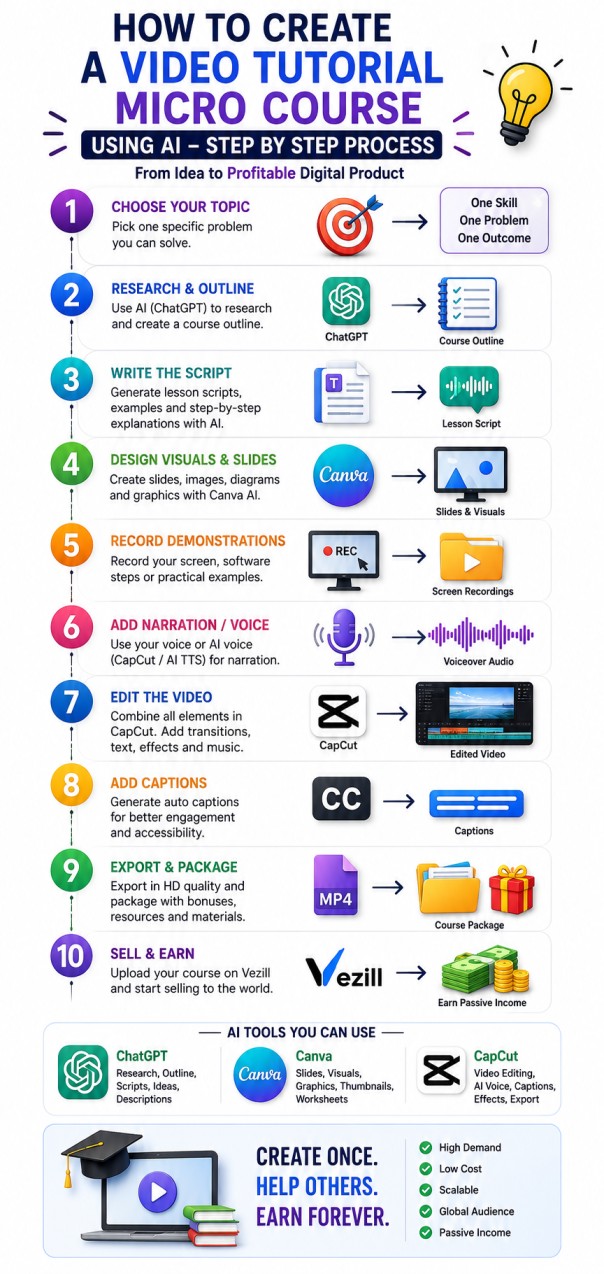
You only need to remember these nine stages:
Find one problem.
Use AI to create the curriculum.
Generate the lesson scripts.
Create slides and visuals.
Record the actual process.
Use your voice or AI voice.
Combine everything into a professional video.
Add templates, worksheets and other useful resources.
Publish your finished micro-course as a digital product.
The simplest formula is:
One Skill + One Problem + One Clear Outcome + One Short Course = One Sellable Digital Product
Don't wait until you can produce a Hollywood-quality course.
Start with something genuinely useful.
Teach one skill well.
Help the learner achieve one result.
Use AI to make production faster.
Then improve your course based on actual learner feedback.
Create once. Improve continuously. Sell repeatedly.
Discover more articles you might be interested in
Build a Successful Digital Product Business on Vezill: Create, Market & Sell Online
By Super Admin
Learn how to use AI and ChatGPT to make money online
By Super Admin
Discover 150 high-demand micro-course, video tutorial and explainer video ideas you can create with AI and sell online as digital products.
By Super Admin
Discover the best AI tools for small businesses that automate marketing, customer support, accounting, content creation, emails, scheduling, and administration.
By Super Admin
Get the updates, on newly released, popular & fast-moving MRR digital products
Up to Top
Comments All
Stephen
@stephen
I like how it breaks down creating video tutorials and microcourses with AI into simple, practical steps. It makes the whole process feel much easier, especially for beginners who want to create useful content without overcomplicating things.
September 08,2026 At 09:37 PM